

Why Do WhatsApp, Instagram, TikTok and Other Apps Compress Videos?
The video was fine. Then you sent it.
You record a video on your phone, and it looks sharp in your camera roll: clean edges, real detail, no blockiness. Then you send it to a group chat, post it to Instagram or drop it in a Discord server, and what the other side sees is worse. It's softer, blockier, and smeared behind anything that moves. Your original is untouched in your camera roll. What changed is the copy the platform delivered, and that copy went through a process most people never see.
It isn't a bug, and your phone didn't record a bad file. Almost every platform that lets you send or upload video processes it before anyone else sees it, for reasons that have little to do with wanting your video to look worse. This post covers why that happens, what it does to the file, what you can do about it on each platform, and which resolution and aspect ratio to export for Instagram, TikTok, YouTube and Discord.
If your video won't send at all, that's a related but different problem, covered in why videos fail to send on email and WhatsApp. This one is about the video that does go through and comes out worse.
Why do apps compress video?
It's natural to assume platforms compress video to save disk space, but that's only part of it. A platform serving video to millions of people solves several problems at once, and re-encoding every upload handles most of them in one step.
Storage is real, but it doesn't explain why a video only you will watch still gets compressed. The bigger reason is delivery. Video has to play reliably on a huge range of devices and connections, often within a second of someone tapping it. A file encoded with whatever settings your phone used is a poor fit for that. It might be far bigger than a small screen needs, use a codec older devices decode badly, or stutter on weak mobile data.
So platforms re-encode incoming video into something standard: a codec every target device plays smoothly, a bitrate that balances quality against delivery cost, and often several versions at different quality levels, so a phone on slow data gets a smaller file than a laptop on fiber. That's why "compression" isn't one thing. What happens to your video depends on which of these problems a platform is mainly solving, and that varies a lot.
What happens during "compression"
The word covers several separate operations a platform may combine:
- Re-encoding. The video is rebuilt with new encoder settings. Most visible quality change happens here.
- Bitrate reduction. The video gets a smaller data budget per second. My explanation of bitrate and CRF covers how that works.
- Resolution reduction. The pixel dimensions are scaled down, a separate lever from bitrate.
- Frame rate changes. Some platforms cap frames per second for slow connections or older devices.
- Codec conversion. The video may be re-encoded into a more widely supported or more efficient codec.
- Multiple versions. Larger platforms generate several playback resolutions from one upload, matched to each viewer's device and connection.
- Previews. A separate, more heavily compressed thumbnail or clip for feeds, distinct from what people watch.
Not every platform does all of these, and the three that matter most for how your video looks, re-encoding, bitrate and resolution, are the ones that vary most between platforms.
Why a 1080p video can still look worse
Resolution and quality aren't the same measurement. A video can be delivered at exactly its original resolution and still look worse, because resolution only says how many pixels there are, not how much real detail is in them.
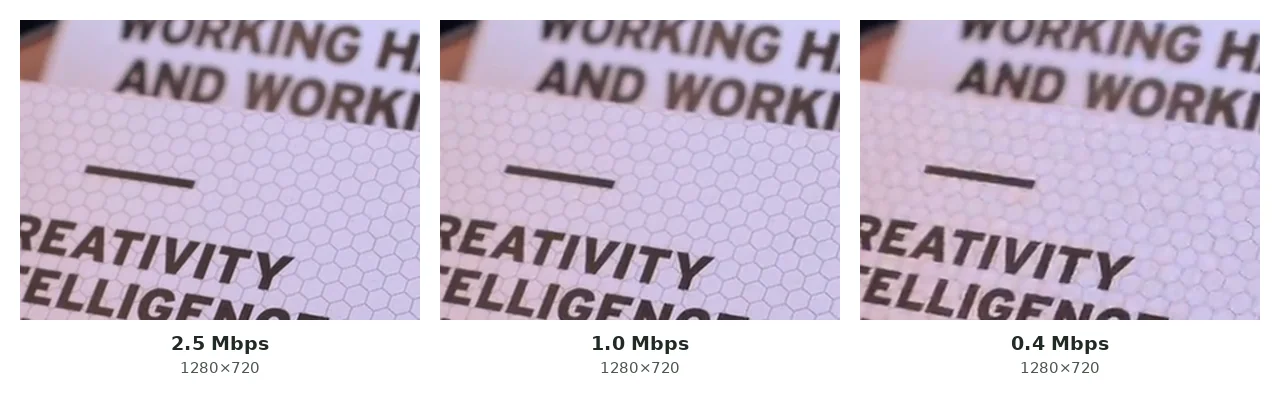
Bitrate controls the detail. Two 1080p videos with the same pixel grid but very different bitrates can look completely different, because the lower-bitrate one forced the encoder to throw away much more. Pushed far enough, you see familiar symptoms: blocky flat areas like skies and walls, lost detail in grass, hair, fabric and text, smearing behind moving subjects, banding in gradients, muddy shadows and small text that's hard to read. None of these needs a resolution drop. A video can go in at 1080p and come out at 1080p with every symptom on that list, because only the bitrate changed. I look at the same issue from another angle in why your video looks blurry.
Platform by platform
The mechanics above explain most of it. What differs between these eight apps is whether they compress at all, how hard, and what you can do about it.
Sending a video the normal way, through the gallery, camera or media picker, triggers automatic re-encoding to keep the file small and quick to preview in the chat. That matters for an app used in markets where mobile data is expensive. The bitrate drop is often large, especially on big files, though WhatsApp doesn't publish exact numbers. The fix is to send it as a document (paperclip, then "Document" instead of "Gallery" or "Camera"). WhatsApp then leaves the file alone, and it arrives as a download instead of an inline video. My guide to WhatsApp send limits covers the same trick from the file-size side. Once a compressed copy has been delivered, downloading it again only gets you that compressed copy.
Every upload is re-encoded, and there's no document-style way around it. Aspect ratio adds to the damage. Reels and Stories are built around a vertical 9:16 frame, so landscape footage gets bars or a crop on top of the re-encode, and a 4K upload gets scaled down and compressed harder, since Instagram delivers well below 4K anyway. Exporting at Instagram's native 9:16, 1080×1920 before uploading, as I cover in the export settings section below, reduces the damage without avoiding it. There's no way to download a post back at original quality.
TikTok
TikTok also re-encodes everything, and it tends to compress harder than Instagram, especially on fast motion and quick cuts, because its feed is built for instant playback while scrolling. It uses the same 9:16, 1080×1920 shape as Reels. Uploading footage that's still close to its original quality, rather than something already compressed once, gives TikTok's pass more real detail to keep. As with the others, you can't download a posted video back at better than TikTok's delivered quality.
YouTube
YouTube transcodes every upload into several resolutions, from around 360p up to whatever the source supports, so each viewer gets a version that suits their device and connection. It's the one platform here where a bigger, higher-bitrate source helps: it gives the transcoder more real detail at every level, including the one each viewer ends up watching. So the practical advice is the opposite of the other platforms: don't shrink the file more than you need to before uploading. You can't get your original upload back through normal viewing or downloading; you get one of the transcoded versions.
iMessage
What happens depends on whether the message goes over iMessage (blue bubble, Apple devices on both ends) or falls back to MMS through the carrier (green bubble). iMessage does some size-based optimization but stays usable. MMS is usually compressed much harder by the carrier, often to well under a megabyte, which is a common and overlooked reason an iPhone video looks far worse than expected. Check that the bubble is blue first. iOS also has a setting, Settings → Messages → "Low Quality Image Mode," that lowers media quality on purpose to save data. Turn it off if it's on. AirDrop or a cloud link avoids messaging compression entirely.
Facebook Messenger
Messenger shares infrastructure with Instagram and Facebook and re-encodes video about as hard as they do, sometimes harder. It has no well-known "send as file" option like WhatsApp's document trick, so a cloud storage link, or WhatsApp's document option if both people use it, works better when quality matters. Once a video is compressed and delivered, Messenger has no way to get the original back.
Telegram
Telegram compresses by default when you send a normal video, but it's unusual here because it shows a "send as file" option right in its interface. Choosing that delivers the file exactly as uploaded, and Telegram's generous size limits make it a practical everyday choice, not just a workaround. It's the one platform on this list where the fix is right there before you send.
Discord
Discord is the exception: it doesn't automatically re-encode video. What you upload is close to what the server receives. Its limit is the upload size cap, which depends on your tier: 20MB on a free account as of 2026 (up from 10MB), 50MB on Nitro Basic and 500MB on Nitro. A video that fits plays at its original quality, and one that doesn't has to be compressed by you first. An exact target size beats guessing at a quality setting here, and because nobody re-encodes after you, bitrate matters more than resolution: a 720p clip with more bits per pixel often looks better than a 1080p one squeezed into the same 20MB. The Discord video compressor has one-tap presets for the Free, Nitro Basic and Nitro limits.
How much does each platform compress?
No single number holds up. "80% smaller" or "compresses to X Mbps" isn't a fixed property of a platform. It depends on the source video's resolution, bitrate, codec, frame rate and length, plus how you sent it and sometimes even the app version. The same platform can compress two videos by very different amounts, because an efficiently encoded video has less obvious fat to trim than one recorded at a very high bitrate.
As a rough guide, the platforms chasing small, fast-loading inline playback (WhatsApp's normal video send, Instagram, TikTok and Messenger) cause the most visible loss. YouTube changes the file a lot but is built to keep quality at whichever level you watch, since it isn't chasing the smallest file. Discord and Telegram's file option don't compress at all by default. Treat any specific percentage you read for a platform as one person's test, not an official figure. None of these platforms publish one.
Will this platform compress my video?
- How are you sending it? The normal media picker triggers compression on WhatsApp, Telegram (unless you pick the file option), Messenger, Instagram and TikTok. "Document" or "file" on WhatsApp and Telegram skips it.
- Is there an HD toggle? Some apps offer one in settings. It raises the quality ceiling but doesn't stop re-encoding, and platforms rarely say exactly what it changes.
- What's the source like? A video that has been compressed once already has less detail left, so the same platform settings do more visible damage to it.
- Does the platform compress by default at all? Discord doesn't, for uploads under its limit. YouTube compresses but aims to keep quality rather than minimize size. Everything else here compresses by default on the normal send path.
Can you restore the original quality?
No. Once a platform's encoder throws away detail, that detail is gone from the file it delivers. Downloading the compressed copy, converting it or running it through an upscaler doesn't rebuild what was lost. Those tools can make a compressed video look somewhat better by smoothing artifacts or guessing at plausible detail, which is very different from restoring the original. I cover that difference in whether video upscaling works.
Repeating it makes things worse. Download a video a platform already compressed and upload it somewhere else, or compress it yourself before re-uploading, and the next pass starts from a file that already lost detail. It can't tell the earlier damage from the real footage, so each pass adds to the loss. My guide to repeated compression explains why and how to avoid stacking passes without noticing. If quality matters, the only real fix is going back to your original file, not a copy that went through someone else's encoder.
Should you compress a video before uploading it?
Sometimes. On platforms that re-encode hard no matter what (WhatsApp's video send, Instagram, TikTok, Messenger), a huge source doesn't buy you a better result. Their compression dominates either way, and a smaller upload mainly arrives faster. Compressing first helps when the source is far bigger than the destination needs, like a 4K screen recording going somewhere that delivers well under 4K. Downscaling and compressing it yourself, in a controlled way, usually beats letting an aggressive platform do all the work on a much bigger file than it needed.
YouTube is the clear exception. Its pipeline works best from large, high-quality sources, so shrinking first usually costs you at every level it generates. Discord and Telegram's file option are exceptions the other way: they won't compress at all, so compressing is purely your own choice. As a general rule, when a platform will process your video no matter what, a clean, moderately sized file from a video compressor gives its encoder less room to do damage than a giant original crushed down in one uncontrolled step.
Best export settings for each platform
Fitting under a platform's upload limit isn't the same as looking good on it. A video can clear the limit and still come out soft, cropped or boxed in by black bars, because it was exported at the wrong shape for where it's going. You can't stop the platform's own re-encode, but you can hand it the resolution and aspect ratio it wants, so its pass does as little damage as possible.
| Platform | Aspect ratio | Resolution to export | What matters most |
|---|---|---|---|
| Instagram Reels and Stories | 9:16 | 1080×1920, 30fps | The vertical shape; the wrong ratio causes a crop or bars |
| TikTok | 9:16 | 1080×1920 | Starting quality, since TikTok compresses hard |
| YouTube | 16:9, or your source's shape | As high as your source allows | Not over-compressing before upload |
| Discord (free) | Your source's shape | 720p to 1080p, depending on length | Getting under 20MB, since Discord doesn't re-encode |
Instagram and TikTok scale anything above 1080×1920 down on upload, so a 4K export only hands them a bigger file to squeeze. Feed posts on Instagram also take 4:5 and 1:1, but 9:16 works everywhere on the app, so it's the safer shape if you only export one version. YouTube is the opposite case: it has no practical size limit for most creators and builds every streaming version from what you upload, so a bigger, cleaner source helps. My video bitrate chart lists YouTube's recommended upload bitrates.
The shape problem is easy to underestimate until you see it. I dropped one landscape frame into a vertical 9:16 slot both ways a platform can handle it:
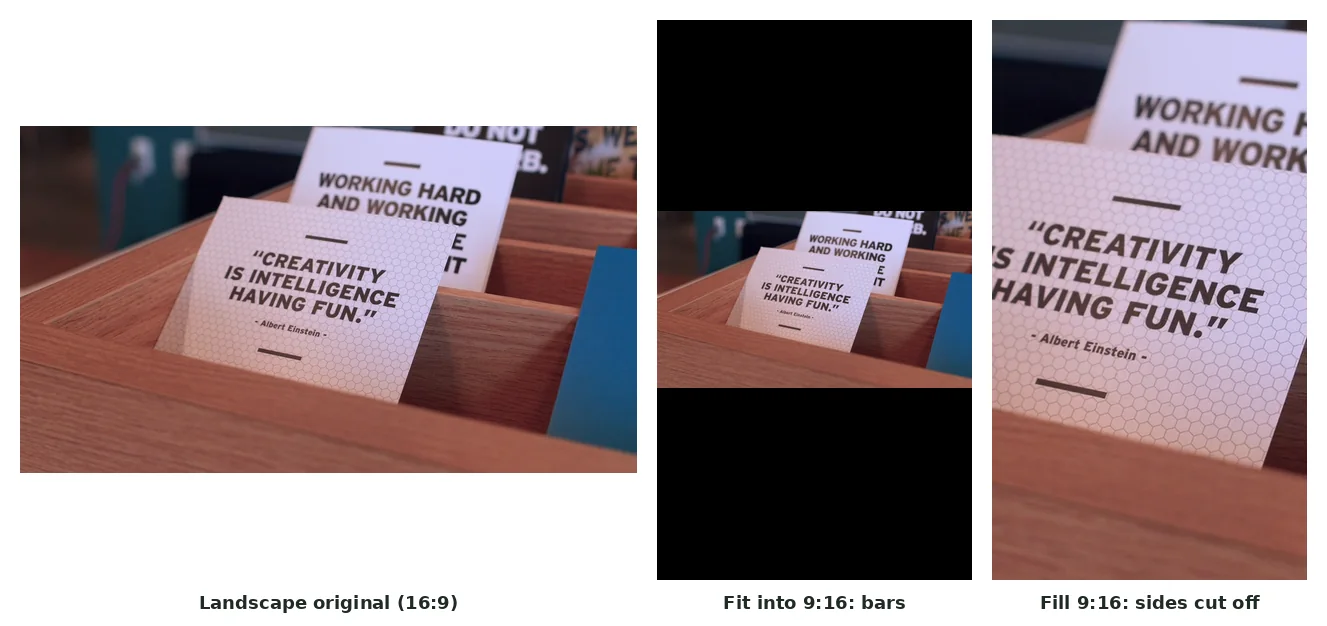
If one clip is going to several platforms, export a vertical 9:16 version for Instagram and TikTok and a separate one for YouTube or Discord, instead of letting each platform crop or pad one shape its own way. Do the framing in your editor, then use a compressor only for the size step: a full-quality file for YouTube, a size-capped one for Discord.
How to keep better quality when sharing
1.If quality matters most
Use the send-as-file or document option where it exists (WhatsApp, Telegram), share the original instead of a re-downloaded copy, and avoid exporting more than once.
2.If upload speed matters most
Compress to a sensible size and resolution first, especially when the source is much bigger than the platform needs.
3.If the platform compresses anyway
Give it a clean, moderately sized file, not a giant original and not something already crushed small. Both extremes give the re-encode a worse starting point.
4.Check your send method
On WhatsApp and Telegram, the gap between "video" and "document" or "file" is often bigger than any compression setting.
5.Keep the original
Once a platform compresses your video, that's the copy you're stuck with for sharing or editing later. Keep the source until you're sure you won't need it.
Frequently asked questions
Why does WhatsApp reduce video quality?
It re-encodes videos sent through the normal media picker to keep them small and quick to preview. Sending as a document skips that, but the video won't play inline.
Why does Instagram make my video blurry?
Instagram re-encodes every upload, and a mismatched aspect ratio adds a crop or bars on top. Exporting at 9:16, 1080×1920 beforehand reduces the damage.
Does TikTok compress uploaded videos?
Yes, and usually harder than Instagram, especially on high-motion footage. A source that hasn't been compressed before gives TikTok's pass more detail to keep.
Does YouTube compress videos?
Yes, but differently. It transcodes uploads into several resolutions for different connections, and a bigger, higher-quality source helps instead of hurting.
Why does my iPhone video look worse after sending it?
Often the message fell back to MMS (green bubble) instead of iMessage (blue bubble), and carriers compress MMS much harder. Check that both sides have iMessage turned on.
Does Messenger compress video?
Yes. It re-encodes with a noticeable bitrate drop, similar to Instagram, and has no documented send-as-file option to skip it.
Does Telegram compress video?
By default, for videos sent the normal way. Telegram's "send as file" option delivers it uncompressed.
Does Discord compress video?
Not automatically. Its real constraint is the upload size limit, which depends on your tier. A video under the limit is delivered essentially as uploaded.
Can I send a video without compression?
On WhatsApp and Telegram, yes, by sending it as a document or file. Instagram, TikTok and Messenger have no equivalent.
Can compressed video quality be restored?
No. Once detail is discarded, downloading, converting or upscaling the compressed copy can't bring it back. Those tools can only make the existing version look somewhat better.
Should I compress my video before uploading it?
Usually only if the source is much bigger than the platform needs, or the platform won't compress it at all (Discord, Telegram's file option). For YouTube, compressing first usually hurts.
What resolution should I export for Instagram Reels and TikTok?
1080×1920 in a 9:16 frame, at 30fps. Anything larger gets scaled down on upload, so a 4K export only gives the platform a bigger file to squeeze.
What if I only have one exported file for every platform?
A 9:16, 1080×1920 export works acceptably everywhere, though YouTube and Discord will show it with bars if it was framed vertically. A version made for each platform still looks better where it matters.
Does a target file size make sense for Instagram or TikTok?
Not really. Both re-compress everything, so an exact size mostly controls upload time. Discord, email and messaging apps are where a target size decides the outcome.
Why is my 1080p video blurry after uploading?
Resolution and quality aren't the same. A video can keep its pixel dimensions while its bitrate drops sharply, and that's what causes the blockiness, smearing and lost detail.