

Does Video Upscaling Actually Work? A Skeptical, Technical Answer
The question to ask before you upscale anything
One question should bother anyone who uses a video upscaler, and it rarely comes up. A video recorded at 480p holds a fixed, finite amount of visual information. When software hands the clip back at 4K, with four times the pixel dimensions, sharper edges and textures that weren't visible before, where did the extra information come from?
Most explanations skip that question in favor of before/after sliders built to impress. Nothing recovers detail a camera never captured. A good upscaler makes an educated, statistically informed guess about what that detail probably looked like, and whether to trust the guess depends on the footage you give it.
What an upscaler does
Stripped down, an upscaler does one thing. It takes a frame with some number of pixels and produces a new frame with more. What decides whether the result looks great or fake is how it chooses the value of each new pixel. There are two very different families of answer, and mixing them up causes most of the skepticism and most of the disappointment.
Why making a video bigger doesn't add detail
The oldest approach is interpolation: stretch the existing pixels and calculate new ones from their neighbors. It doesn't learn or predict anything. It just does math on what's already in the frame.
Nearest-neighbor is the crudest. Each new pixel copies the closest existing one, which gives visible blocky squares. Bilinear averages nearby pixels, trading blockiness for blur, so edges turn mushy. Bicubic, the default in most video software, samples a wider area and fits a smoother curve, giving clearly crisper edges. Lanczos uses an even wider window and keeps edge contrast better still.
What matters applies to all four: none of them recover anything. They estimate new pixels only from pixels already nearby. Enlarge a small, blurry photo of a face with any of them and the face gets bigger and perhaps smoother, but the software has no idea what the eyelashes or skin texture looked like, because that information was never in the file. It spreads what's there across more pixels, so the picture gets bigger without getting more detailed.
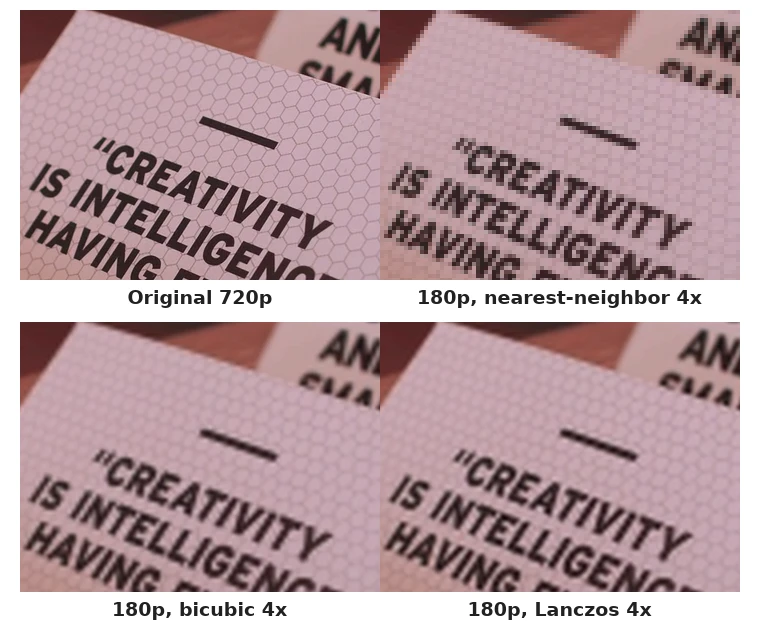
If upscaling only meant this, the skepticism behind searches like "does upscaling actually work" would be fully justified.
What AI super-resolution changes
AI upscaling, or video super-resolution, works differently. A neural network has been trained on a huge number of low-resolution and high-resolution image pairs and has learned what fine detail, like hair, fabric weave, skin pores and text strokes, tends to look like given a certain low-resolution input. Shown a new frame, it isn't looking up the right answer. It predicts the most statistically plausible high-resolution version of that input.
That's why the results look more convincing than interpolation. But the details matter here, because this is where marketing overreaches:
- Observed information: the real pixel values in your low-resolution source, the only part that's ground truth.
- Inferred information: what the model deduces from those pixels plus everything it learned in training.
- Reconstructed detail: the new pixels it outputs, built from both.
- Hallucinated detail: reconstructed detail that looks plausible but doesn't match anything true about the original scene.
A good model keeps the balance heavily on reconstruction rather than hallucination. No version of this technology removes hallucination completely, because upscaling is an inverse problem: many different high-resolution images could shrink down to exactly the same low-resolution input. The model has to pick one, the most likely one, not the true one, because the low-resolution data alone can't say which is correct. That's a property of the problem, not a flaw in any product.
So "recovering lost detail" is the wrong description. What it actually does is make a video look more like a plausible high-resolution version of the scene, based on patterns learned from millions of other scenes. That's real and useful, but it's a different claim from recovery.
Why video is harder than a photo
All of that applies to a single image. Video adds consistency over time. Upscale one photo and you're done. Upscale a video of a face and the model produces dozens of frames per second, and each frame's guesses about fine detail need to roughly agree with the frames around it. When they don't, you get flicker: texture that shimmers, hair that changes pattern from frame to frame, small text that warps as it moves, leaves that seem to crawl. Those are video-only artifacts. A single upscaled photo can't have them, since there's nothing for it to disagree with.
Video can also give a model more to work with than one frame. A system designed for it can draw on several neighboring frames, since small movements sometimes reveal a detail more clearly a frame or two later. That's real extra observed information, not just inference. Motion cuts both ways, though. Fast subjects, camera shake and motion blur make frames harder to line up, and that's where temporal artifacts show up most.
So does it work? Yes, conditionally
Usually worth trying
Clean 480p or 720p footage with accurate but limited detail. Sharp 720p going to 1080p. Clean, slightly soft 1080p going to 4K. Compressed footage with visible blockiness when no cleaner copy exists. Older digital camera footage. Animation, whose clean edges models handle well. Anything shown bigger than its native resolution supports.
Limited results
Heavily compressed video, where the model has to guess around real artifacts. Very blurry or motion-blurred footage. Fast motion in general, which strains consistency between frames. Very noisy or low-light footage. Tiny faces or text, where there's little source detail to work from.
Poor candidates
Extremely low-resolution footage where a face is a handful of pixels. Unreadable text: a model can sharpen letter shapes but can't reliably invent the right letters if they're truly illegible. Footage with serious focus problems, where the blur is baked into the frame, as I explain in why your video looks blurry. And footage where the information you want was simply never captured.
The common thread: upscaling works best when real, accurate detail exists at a small size and just needs to be shown more clearly. It works worst when asked to invent something that was never there. That's the difference between making something look better and recovering the exact original, and treating those as one claim causes most of the disappointment.
The "1080p to 4K" myth
This is probably the most common misunderstanding. Run a 1080p video through an upscaler set to 4K and you get a file that's technically 3840×2160, the same dimensions as native 4K. In any meaningful sense, it isn't the same as footage from a 4K sensor.
Native 4K has about four times the camera-captured detail of 1080p across the frame. Upscaled "4K" has the observed detail of the 1080p source plus the model's best guess at what sits in between. Both files say 4K, but they hold very different things. The resolution number describes frame size. It says nothing about how much of the frame is captured information and how much is prediction.
That doesn't make 1080p-to-4K upscaling worthless. On a 4K screen it generally looks better than the 1080p original shown at the same size, with less pixelation and smarter sharpening than a plain stretch. It just isn't equivalent to native 4K, and any tool implying otherwise glosses over exactly this distinction.
If you want to see the difference on your own footage, you can upscale 1080p to 4K in your browser and compare the result with the original on a before/after slider.
Why AI upscaling can look better than you'd expect, and why that cuts both ways
An AI-upscaled frame can sometimes look sharper than its resolution suggests, because the model isn't just resizing. It applies learned expectations about what edges, skin, hair, leaves and text generally look like, and makes confident, clean decisions where interpolation makes fuzzy compromises.
That's the strength, and it's also the mechanism behind every failure. A model confident enough to draw convincing skin is confident enough to draw skin that's slightly waxy or too uniform. A model that rebuilds plausible text sometimes rebuilds the wrong letters near the edge of legibility. A model that knows what leaves usually look like can turn a still bush into something that shimmers, because it re-guesses the texture every frame instead of tracking real leaves. Repeating patterns like brick, mesh and fabric often go wrong, because the model's idea of "what a pattern looks like" can override the pattern in your footage.
Convincing detail and invented detail come from the same mechanism: a network filling gaps with what it has learned is likely. There's no separate switch to turn hallucination off. It's a matter of degree, and it gets worse the less real information the model starts with.
The Reddit skepticism is mostly fair
People searching "video upscaler Reddit" or "AI upscaling Reddit" usually aren't after a tutorial. They want to know whether it's marketing dressed up as technology. The skepticism is earned:
- Demo footage is cherry-picked: clean sources, well-lit faces, content like what the model trained on, and nothing like a shaky, noisy phone video from 2014.
- Before/after sliders persuade by design: a bigger, higher-contrast "after" can look dramatically better even when the real gain is modest.
- Sharpening gets mistaken for reconstruction: a basic sharpening filter can look "enhanced" without adding any detail, and it's hard to tell apart from real super-resolution in a quick screenshot.
- Models differ a lot: a bad experience with one says little about the others.
- "Higher resolution" gets confused with "more real detail": related claims that marketing rarely separates.
My conclusion isn't "AI upscaling is fake" or "AI upscaling is magic." The technology is real and can be very useful, but the accurate word for what it does is reconstruction, not recovery.
Is it worth using?
It depends on a few concrete factors. The source's resolution and quality: cleaner, more detailed small versions give better results. The target: 2x is much safer than 4x, because the further you push, the more of the frame is inference. Screen size and distance: a phone video watched on a phone rarely needs it, but the same file on a TV might. Content type: animation and clean graphics upscale more reliably than noisy, fast footage. How much exact accuracy matters: casual viewing tolerates reconstruction fine, but archival or forensic use should treat upscaled output as an approximation, not evidence. And whether it will be compressed again afterward, which can undo part of the improvement.
Probably worth it: a clean 720p recording that looks a bit soft on a 1440p or 4K display. The detail is real; it just needs to be shown bigger.
Maybe: an old, moderately compressed 480p clip you'd like to make nicer to watch, without expecting it to pass for recent footage.
Probably not: a very blurry, low-resolution clip where you're hoping a face or text becomes readable. If the original camera never resolved the detail, inference won't reliably bring it back, and treating a confident guess as an answer, especially for a license plate or a face, is exactly the overreach this technology invites.
To test a specific clip, my video upscaler runs in your browser, so finding out whether a file is a good candidate takes no install and no upload. Clips up to 720p go through an AI model, and taller ones through FSR, which I explain in what is FSR.
What to expect
The technology as it exists today sits between the two extremes people argue about. It isn't a scam that does nothing: AI super-resolution gives more convincing results than stretching. It isn't magic that recovers information the camera never captured either. It combines the real detail in your footage with an informed guess about the rest, and the guess is only as good as the information it starts from.
If the source has real detail, the result will look good. If the source is thin, you get a confident-looking guess that may not hold up when you look closely.
Frequently asked questions
What does a video upscaler do?
It increases a video's pixel dimensions and fills in the new pixels, either by estimating them from neighboring pixels (traditional scaling) or with a trained model that predicts plausible detail (AI super-resolution). Neither recovers information the camera didn't capture.
Does AI video upscaling work?
Conditionally. On footage with real but limited detail, like clean low-resolution or moderately compressed video, it gives a real, visible improvement. On footage with heavy blur, severe compression damage or very little resolution, results are limited.
If I upscale 1080p to 4K, is it really 4K?
The file has 4K dimensions but not native 4K's camera-captured detail. Part of the frame is real detail from the 1080p source and part is the model's reconstruction. It can still look better than the original, just not identical to real 4K.
Does AI upscaling add real detail or make things up?
Both, in a mix that depends on the footage and the model. A good upscaler leans heavily toward plausible reconstruction, but some invented detail is unavoidable, because many high-resolution images match the same low-resolution input and the model has to pick one.
Why is video upscaling harder than photo upscaling?
A photo only has to look convincing on its own. In a video, each frame's rebuilt detail has to stay consistent with the frames around it, or you get flicker and unstable texture.
Are video upscalers worth using?
It depends on the source. Clean, moderately low-resolution or slightly soft footage upscales well. Very blurry, heavily compressed or tiny footage, especially when you hope text or faces become readable, tends to disappoint.
Why is Reddit skeptical about AI upscaling?
Demos are cherry-picked, sliders make modest gains look dramatic, and basic sharpening gets mistaken for reconstruction. The skepticism is reasonable.
Is 2x upscaling more reliable than 4x?
Generally, yes. The further you push past the source resolution, the more of the output comes from inference instead of real pixels, which raises both the visible improvement and the risk of unconvincing detail.