

What Is FSR? How FidelityFX Super Resolution Works in Video Upscaling
Where the term comes from
If you ran a video through my upscaler and it said it used "FSR," that's not a label I made up. FSR stands for FidelityFX Super Resolution. It comes from PC gaming, where AMD built it for a different problem than the one I use it for. Knowing where it came from explains what it's good at and where it falls short.
The gaming problem FSR was built for
Rendering a game at native 4K is expensive. Every frame pushes millions more pixels through the GPU than 1080p does, and a lot of hardware can't hold a good frame rate at that resolution. AMD's answer, starting with FSR 1 in 2021, was to render the game at a lower internal resolution and upscale each finished frame to the target resolution just before it reaches the screen. That recovers most of the sharpness of a native render for a fraction of the cost.
What made FSR spread quickly was that, unlike Nvidia's DLSS, the early versions needed no special AI hardware. DLSS depends on Nvidia's Tensor Cores. FSR 1 runs as a compute shader on almost any modern GPU, whether AMD, Nvidia or Intel. That "runs everywhere" property is why FSR turned out to be useful outside games too, including in a browser tab.
What FSR 1 does to a frame
In practice, FSR 1 is two passes run one after the other on a single frame:
EASU (Edge Adaptive Spatial Upscaling) does the enlarging. It isn't a generic stretch. For each new pixel it creates, it looks at the direction and sharpness of nearby edges and interpolates along those edges instead of across them. That's the difference between an upscale that keeps a diagonal line looking like a line and one that turns it into a soft staircase.
RCAS (Robust Contrast Adaptive Sharpening) runs second and cleans up the slight softness EASU leaves. It sharpens selectively, putting contrast back into edges without amplifying noise or adding halos the way a basic "unsharp mask" does.
What matters most for video: both passes only look at the one frame being processed. They don't use history from earlier frames, motion vectors or a trained model. It's plain per-pixel math, which is why it's cheap enough to run as a GPU shader on an ordinary laptop, frame after frame.
FSR 2, 3 and 4, and why I don't use them
AMD kept going after FSR 1, and what changed explains why a video tool doesn't simply use the newest version.
FSR 2 moved from single-frame to temporal upscaling. It reuses pixels from previous frames, lined up with motion vectors the game engine supplies, to rebuild detail more accurately than one frame allows. It looks clearly better than FSR 1 in motion. The problem is those motion vectors. A game always knows exactly how every object moved between frames, because it's the one moving them. A video file in a browser has no such data. You'd have to estimate the motion from the footage itself, which is much heavier and much less reliable to compute for every frame.
FSR 3 adds frame generation on top of FSR 2, creating new in-between frames to raise the frame rate. That fixes a real-time rendering problem, low frame rates in games, which doesn't apply to a video you upscale once and save.
FSR 4 is the newest and the biggest change. AMD rebuilt it around a machine learning model that runs on the AI cores of RDNA4 GPUs (the Radeon RX 9000 series). Its quality is close to DLSS. The cost is exactly what FSR spent three generations avoiding: it only runs on that new hardware, not on any GPU, which rules it out for a tool meant to work on whatever machine opens the page.
FSR 1 isn't AMD's newest, but it's the one generation built around the same constraints a browser-based video tool has: no motion data and no special AI hardware.
Why my upscaler doesn't use FSR for everything
This part is specific to how I built my tool. It doesn't run FSR on every video. It has two engines and picks one automatically based on your video's height.
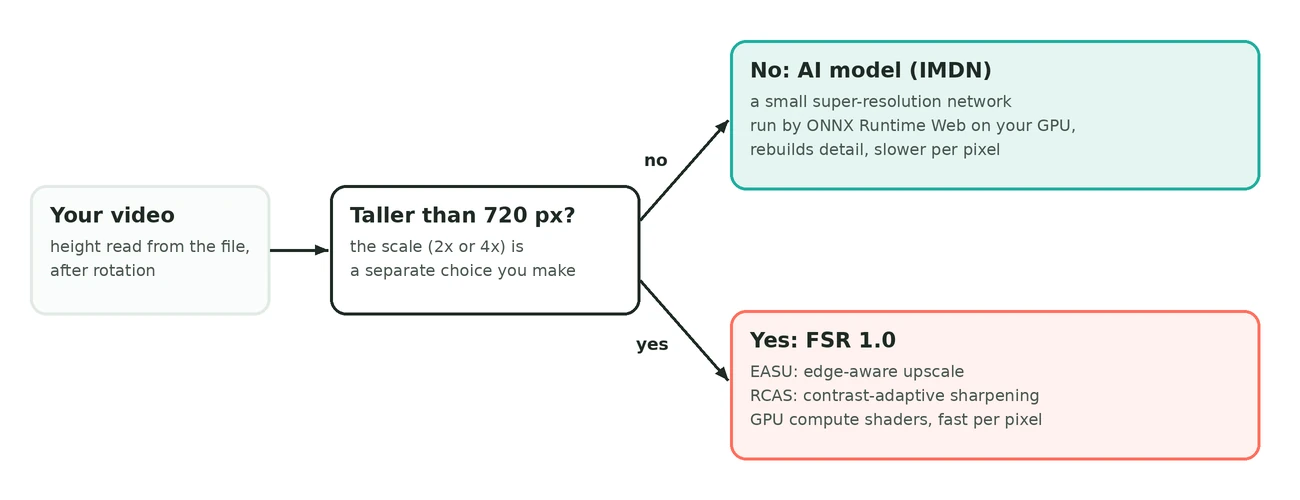
For videos 720 pixels tall or less, it runs an AI super-resolution model, IMDN, a small real-time network that runs in the browser through ONNX Runtime Web. At that size there aren't many pixels per frame, so extra compute on a model that rebuilds detail, instead of interpolating it, pays off. It's slower per frame but still finishes in reasonable time.
Above 720p, the same model gets painfully slow. A 1080p frame has more than twice the pixels of a 720p one, and every pixel has to go through the network. That's where the tool switches to FSR. It's far lighter per pixel, and at these resolutions the frame usually already has enough real detail that FSR's edge-aware upscale plus sharpening gives a clearly sharper result, without running a full model over every frame of a video that may be thousands of frames long.
So FSR here is neither a premium nor a budget engine. It's what lets larger videos finish in a sane amount of time on an ordinary laptop, which matters because the whole job runs in your browser. You don't choose the engine; the tool picks based on your video and shows which one it used when it's done. It also has a separate mode for anime and cartoons.
FSR vs. plain resizing vs. a full AI model
"Upscaling" covers approaches with very different costs:
| Approach | How it works | Trade-off |
|---|---|---|
| Classic interpolation (bicubic, Lanczos) | Computes each new pixel from a formula over nearby pixels | Very cheap and built into almost every image library, but blind to edges and content, so results look soft |
| FSR 1 (spatial) | A fixed, edge-aware algorithm: EASU upscales along edges, RCAS sharpens selectively | Clearly crisper than interpolation, at a small fraction of an AI model's cost |
| AI super-resolution (FSRCNN, Real-ESRGAN and similar) | A neural network trained on real image pairs predicts plausible detail | Can look far better, especially at low resolution, but every frame runs through the whole model, which is slow on long, high-resolution video |
| FSR 4 | AMD's newest version, model-based, running on RDNA4 AI cores | Quality close to DLSS, but only on that class of hardware, so a browser tool can't count on it |
Frequently asked questions
Is FSR the same as AI upscaling?
FSR 1, the version browser tools use for larger videos, isn't AI. It's a fixed algorithm, edge-adaptive upscaling plus sharpening, with no trained model. AMD's newer FSR 4 does use a machine learning model, but it needs specific AMD GPUs.
Why doesn't FSR use previous frames for video like FSR 2 does in games?
FSR 2 needs motion vectors, which a game engine supplies because it renders the scene. A video file has no such data, so tools that apply FSR to video use the single-frame FSR 1 approach.
Does FSR upscaling run without a GPU?
It's built as a GPU shader workload, so it needs basic GPU acceleration, which almost every device has, including integrated graphics. It doesn't need dedicated AI hardware the way FSR 4 and most AI models do.
Why does a video upscaler switch between an AI model and FSR?
They make different trade-offs. An AI model rebuilds more convincing detail but costs far more per frame, and FSR is much cheaper but slightly less sharp. Below about 720p the AI model stays fast enough; above it, FSR keeps processing time reasonable.
Is FSR as good as DLSS or FSR 4?
Not quite. FSR 1's single-frame approach can't match what a trained model or temporal accumulation reconstructs. In exchange, it runs on almost any hardware, including in a browser, which DLSS and FSR 4 can't.
Try it
Want to see what FSR does to your own footage? My video upscaler runs in your browser, shows a before/after slider when it's done, and tells you which engine it used. If you're not sure upscaling is worth it for your footage at all, start with what upscaling can and can't recover.