

Why Your Video Won't Send by Email or WhatsApp (and How to Fix It)
It's rarely just "the file is too big"
You've probably heard the numbers: Gmail caps attachments around 25MB, and WhatsApp is stricter. That's true but incomplete. Treat it as one flat size limit and you end up compressing a video far more than needed, or you miss an easy fix that needs no compression at all. Each app fails for its own reasons, and knowing which one you're up against saves the guesswork.
Email: the limit is per message, not per file
Gmail's 25MB cap applies to the whole message, not to the video alone. If you've already attached a couple of photos or a document, the video only gets what's left. Send it by itself in its own email and you have more room than you think. A common mistake is bundling a video with a PDF and two screenshots, hitting the wall, and assuming the video needs to be much smaller than it does.
The limit also differs between providers. Outlook.com and Yahoo match Gmail at 25MB, but the Outlook desktop app defaults to 20MB for other accounts it connects to, and company mail servers often stop at 10MB without telling you until the send fails. iCloud Mail is the odd one out. Attachments over 20MB go through Mail Drop, which uploads files up to 5GB to iCloud and emails a download link instead of a real attachment. Sending from an iPhone with Apple Mail, a fairly large video may go through with no compression at all. You often only notice Mail Drop kicked in because the email shows a link instead of an attachment icon.
Gmail has its own version: when a file is over the limit, it offers to send it as a Google Drive link instead. Check for that before assuming compression is your only option.
If the video really doesn't fit, compress it to an exact size instead of trying settings until one works. My email video compressor has a preset for Gmail, Outlook, Yahoo, iCloud Mail and work accounts, so you don't have to look the numbers up.
WhatsApp: how you send it matters more than the size
WhatsApp treats "send as video" and "send as document" completely differently, and the choice changes both the quality and the size limit. Sent as a video, WhatsApp re-compresses the file so it previews quickly in the chat. That's convenient, but it's a heavy re-encode you don't control, and it's usually why a video looks worse after you send it than it did on your phone. People blame their camera or the other person's screen, when WhatsApp's compression did the damage.
Sent as a document (tap the paperclip or attachment icon, then "Document" instead of "Gallery," "Photos" or "Camera"), WhatsApp leaves the file alone. It doesn't re-compress it, and the size limit jumps to about 2GB. If quality matters more than inline playback, sending as a document is usually the better move, and it removes the size problem for everything but long screen recordings or raw camera footage.
| Method | What happens | Effective limit |
|---|---|---|
| Send as video | WhatsApp re-compresses it; it plays inline in the chat | About 16MB before quality visibly suffers |
| Send as document | The file arrives untouched and opens as a download | About 2GB |
The downside: a video sent as a document doesn't autoplay. It shows up as a file icon with a name instead of a thumbnail, which some people find a little less convenient. For anything you care about, and for longer clips that would look rough after WhatsApp squeezes them, the extra tap is worth it.
That covers the sending side. For why WhatsApp re-compresses video at all, and how seven other apps from Instagram to Discord handle it, see why apps compress your video.
What about Instagram, X and text messages?
The same "the app re-compresses it" pattern shows up almost everywhere, with different details. Instagram re-encodes everything you upload, so there's no document trick there. A smaller file mainly gives you a faster, more reliable upload. X (formerly Twitter) accepts fairly large files but caps video length on free accounts, so a long clip can fail there even at a modest size. Plain text messages (SMS/MMS) are the strictest on many carriers, sometimes compressing hard or failing well under 1MB. That depends on the carrier and is mostly out of your hands, which is why a video sent by text often looks worse than the same clip sent through almost any app.
When compressing it yourself is still the answer
The document trick and Mail Drop links don't help when the other person needs a normal video file that plays anywhere: a relative who won't tap an unfamiliar link, a form that only takes a direct video upload, or a platform that supports neither workaround. Then shrinking the file before you send it is the most reliable option. It's also the quickest when you don't want to explain "tap the link, then download the file" over the phone.
Before you pick a number, it helps to know how much video a limit can hold before the picture turns soft. I worked it out from the quality floor my compressor uses, 0.075 bits per pixel (explained in my video bitrate chart), plus 128 kbps of audio:
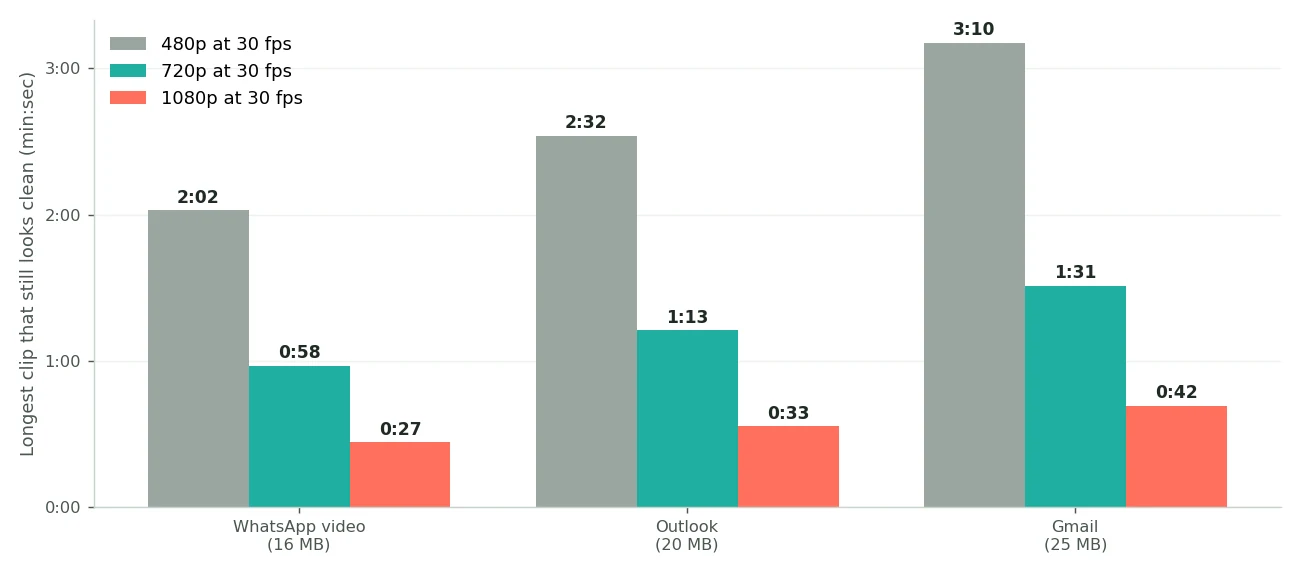
A longer clip still fits under the limit, it just gets less data per pixel. Past those lengths a lower resolution looks better than a starved 1080p picture, which is why my compressor steps the resolution down on its own when the budget runs short.
My free video compressor runs in your browser, so nothing gets uploaded, and you can type the exact size you need instead of guessing with a quality slider. Enter 16MB for a comfortable WhatsApp video, or your email provider's real limit, and download a file that already fits before you attach it.
Frequently asked questions
Why did my video look worse after I sent it on WhatsApp?
You probably sent it as a video, which triggers WhatsApp's automatic re-compression. Sending it as a document keeps the original quality, but it won't play inline in the chat.
Does Gmail's 25MB limit apply to the video or the whole email?
The whole message. The video, images and any other attachments all count against the same cap, so a video sent on its own has the most room.
What is iCloud Mail Drop?
A fallback in Apple Mail for attachments over 20MB. Instead of failing, it uploads the file to iCloud and emails a download link, for files up to 5GB, without you doing anything differently.
Is sending a video as a document on WhatsApp safe for the recipient?
Yes. It's still WhatsApp's own file transfer, delivered as a downloadable file instead of an inline player. Nothing about it is unusual or risky.
Why does a video sent by text message look worse than on WhatsApp?
Carrier MMS is usually stricter than app messaging and often compresses to well under 1MB, depending on the carrier. Neither you nor the recipient can change that.
What size should I aim for if I don't know how it will be sent?
About 16MB. That fits WhatsApp's normal video limit and every email provider too, so the file works however it ends up being sent.