

How Much Can You Actually Compress a 1GB Video?
The short answer
You can compress a 1GB video to any size you like. A compressor will happily write a 10MB file from it. The real question is what's left of the picture when it does, and that depends far less on the "1GB" than on how many minutes that gigabyte holds.
Here is roughly how it breaks down for a typical 1GB file:
- Down to about 60–65% (600–650MB): most people won't see a difference, as long as the original is a regular H.264 file from a camera, screen recorder or game capture.
- Down to about a third (220–330MB): my compressor still keeps the original resolution and frame rate. It looks softer side by side, but it's the same video.
- Below that: the size you can reach is set by how long the video is, and every step down costs resolution. A 1GB GoPro clip still holds 720p at 25MB. A 1GB Zoom recording at 25MB is a 180p smear.
The rest of this post shows where those numbers come from, file type by file type.
How I worked these numbers out
I didn't encode six 1GB files to get these tables. I fed six typical 1GB sources into the planner inside my video compressor, the part of the code that decides what to encode before any encoding starts. You give it a source (resolution, frame rate, bitrate, codec) and a target size, and it answers with the resolution, frame rate, video bitrate and audio bitrate it will use. The encoder then follows that plan.
So every cell below is what my tool would really pick for that file and that size. It is a plan, not a measurement, and two caveats come with it:
- The planner aims about 6% under the target on purpose, because encoders overshoot more often than they undershoot. If the first pass still misses, the tool corrects the budget and tries again, up to three passes in total.
- The source bitrates are typical figures, not your file. Your phone or your capture settings may record at a different bitrate, which shifts every number a little. The method stays the same.
One more detail: my compressor counts a megabyte as 1,048,576 bytes, the way Windows does. "1GB" here means 1,024 of those.
1GB is a length, not a size
A video's file size is its bitrate multiplied by its duration. Turn that around and a fixed 1GB means a different running time for every kind of recording:
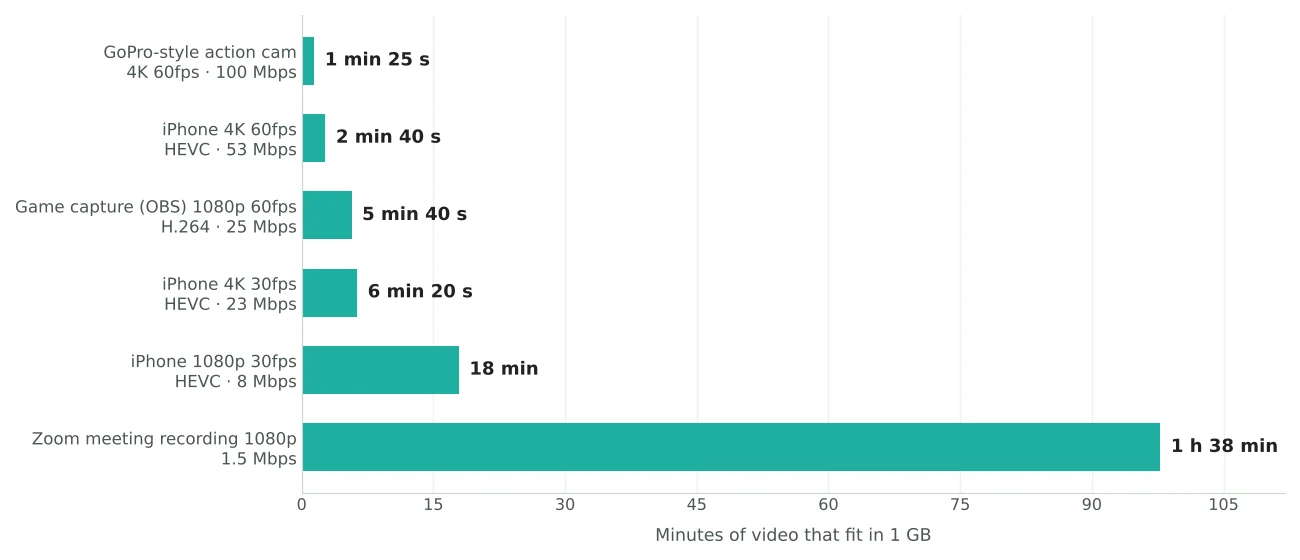
The iPhone figures match the per-minute sizes the Camera settings show for the "High Efficiency" format. The action cam, OBS and meeting figures are common settings for those tools, not fixed rules.
Now hand all six files the same 25MB limit. The GoPro clip has 85 seconds to spread 25MB across. The Zoom recording has 98 minutes. That's a 70-fold difference in bits per second, and it's the whole story of this post.
How small before it looks different?
My compressor has a rule of thumb for when cutting starts to show. It measures quality as bits per pixel, the bitrate divided by the number of pixels it has to fill each second. Once a re-encode keeps less than about 60% of the source's own bits per pixel, the difference becomes visible. Above that line, what you lose is mostly sensor noise and grain you never noticed in the first place.
For a regular H.264 file, 60% of the bitrate at the same resolution means a 1GB file lands at roughly 600–650MB with audio included. The GoPro, OBS and Zoom files all sit there.
iPhone files are the exception, and the reason surprises people. iPhones record HEVC (H.265) by default, and my compressor writes H.264, because every phone, browser and chat app plays H.264. HEVC holds the same picture in about 30% fewer bits. That means an H.264 copy needs around 1.45 times the bitrate to look the same as the HEVC original. Put those together and a 1GB iPhone file has almost no "free" room left. Re-encode it to H.264 at full resolution and it has to keep close to 90% of its original bitrate just to stay above that 60% line.
That doesn't mean an iPhone video can't get smaller. It means you pay for it in sharpness or resolution sooner than with other files. If the place you're sending the video plays HEVC, sending the original HEVC file is sometimes the better move. I explain the container side of that in MOV vs MP4.
How small while keeping the resolution?
Below the "invisible" line there's a long stretch where the video gets softer but stays the same size on screen. My compressor holds the original resolution as long as each pixel still gets at least a fifth of the bits per pixel the source carried. Past that point, a smaller frame filled properly looks better than a full-size frame that's been starved, so it steps down.
Here's the smallest target that still gets each resolution, for each 1GB file:
| 1GB source | Keeps original resolution and fps | Still 1080p | Still 720p | Still 480p |
|---|---|---|---|---|
| GoPro 4K60 | 222 MB | 57 MB | 14 MB (30fps) | 7 MB (30fps) |
| iPhone 4K60 | 322 MB | 83 MB | 20 MB (30fps) | 9 MB (30fps) |
| OBS 1080p60 | 225 MB | 225 MB | 54 MB (30fps) | 26 MB (30fps) |
| iPhone 4K30 | 325 MB | 86 MB | 42 MB | 19 MB |
| iPhone 1080p30 | 332 MB | 332 MB | 157 MB | 71 MB |
| Zoom 1080p30 | 248 MB | 248 MB | 112 MB | 54 MB |
Once a 60fps video would drop below 720p, my compressor halves the frame rate first and spends the saved bits on resolution. Thirty sharp frames look better than sixty blurry ones, especially in a chat window.
Two patterns stand out. First, a 1GB file can lose about two thirds of its size, sometimes more, before it has to give up a single pixel of resolution. Second, short high-bitrate clips go furthest. The GoPro clip still holds 720p at 14MB because it only runs 85 seconds. The 18-minute iPhone clip needs 157MB for the same 720p.
What you get at 500MB, 100MB, 25MB and 10MB
This is the table most people are looking for: type a target size, and here's the resolution my compressor picks for each 1GB file.
| 1GB source | 500 MB | 250 MB | 100 MB | 50 MB | 25 MB | 10 MB |
|---|---|---|---|---|---|---|
| GoPro 4K60 | 4K60 | 4K60 | 1440p60 | 720p60 | 720p30 | 540p30 |
| iPhone 4K60 | 4K60 | 1440p60 | 1080p60 | 720p60 | 720p30 | 480p30 |
| OBS 1080p60 | 1080p60 | 1080p60 | 720p30 | 540p30 | 360p30 | 270p30 |
| iPhone 4K30 | 4K | 1440p | 1080p | 720p | 540p | 270p |
| iPhone 1080p30 | 1080p | 720p | 540p | 360p | 270p | 144p |
| Zoom 1080p30 | 1080p | 1080p | 540p | 360p | 180p | 180p, no audio |
My compressor warns you before the download whenever a 4K source drops to 720p or below, or a 1080p source to 360p or below. At that point the picture has lost more than half its height, and it no longer looks like the video you put in.
Read the table by row and the 1GB label stops meaning much. At 25MB the GoPro clip is a perfectly watchable 720p video, and the Zoom recording is barely a video at all. Same starting size, completely different outcome.
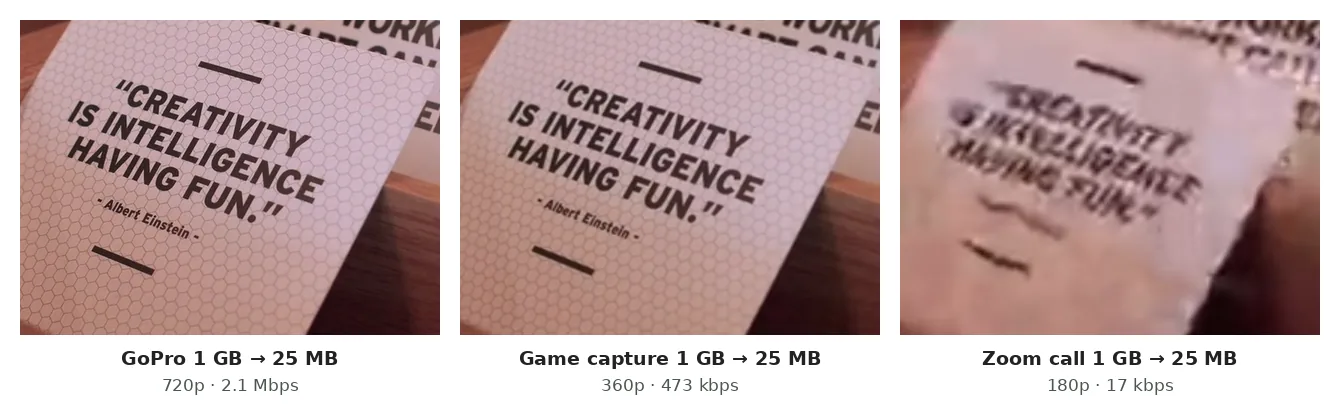
If you're compressing for a specific app, the limits that matter most right now are Discord's 20MB for free accounts, and 25MB for Gmail attachments. The Discord video compressor has those presets built in, and my post on videos that won't send by email or WhatsApp covers the other common limits.
Where compression stops making sense
The Zoom row is worth a closer look, because it shows where size-based compression runs out of road.
Fitting 98 minutes into 25MB leaves about 35 kbps for everything. My compressor aims a little under that and splits it into 16 kbps for a mono audio track and 17 kbps for the picture, at 320 × 180. That plan is arithmetically honest, but H.264 struggles to describe even a tiny moving picture on that few bits. The encoder is likely to overshoot, and my compressor may need all three passes to pull the file back under the limit. Under about 18MB it drops the audio entirely, because 16 kbps of sound would leave the picture with nothing.
For a meeting recording, that's exactly backwards. The voices are the content and the 180p video adds almost nothing. When a long recording has to get very small, compression is the wrong tool. These work better:
- Keep only the sound. An hour of speech as audio is a fraction of the video's size and loses nothing that matters. You can convert the video to audio right in the browser.
- Keep only the words. If someone needs to know what was said, a transcript is a few hundred kilobytes.
- Cut it. Trimming a 98-minute file to the 10 minutes that matter gives the encoder ten times the bits per second, which beats any setting.
- Split it. If the limit applies per file, four 25MB parts of about 25 minutes each come out at 540p, instead of one 25MB file at 180p.
Why I can't give you a number for Light, Balanced and Max squish
My compressor has two modes. "Exact size" works from a target in MB, and every table above comes from that mode. The other mode is the Light, Balanced and Max squish slider, and it doesn't aim for a size at all.
Those three levels set a quality level instead (a quantizer, in encoder terms). The encoder spends whatever bits each scene needs to reach that quality: a lot on a busy scene, very little on a still one. The final size depends on what's actually in your video, so no planner can print it in advance. Two files with the same resolution, length and level can come out wildly different.
What I can tell you is what each level does to the picture:
- Light keeps the resolution and frame rate and trims the fat off over-sized camera files.
- Balanced keeps the resolution, caps the frame rate at 60fps, and squeezes harder.
- Max squish scales everything down to 720p at 30fps or below, the one level that trades resolution for size on purpose.
If you have a hard limit, use Exact size. If you just want the file smaller and don't care whether it ends at 300MB or 380MB, Balanced is usually the right call. And if the video has already been compressed before, by a chat app or a download, there's less fat to cut than its size suggests; every extra encode costs quality of its own.