

MOV vs. MP4: Why Some of Your Videos Won't Open Everywhere
The file isn't broken, it's a MOV
You film something on an iPhone, AirDrop it to a friend or drop it into an upload form on a Windows PC, and it won't open, plays with no sound, or gets rejected. The file isn't corrupted. It's almost certainly a .mov file, and MOV is pickier about where it works than most people expect.
MOV is Apple's QuickTime container. iPhones and Macs have recorded to it by default for years, and inside Apple's own software it just works: Photos, iMovie, Final Cut and Safari all handle it. Take the same file to a Windows machine, an older Android phone, some web upload forms or software built around fewer formats, and support gets patchy. Windows can often play MOV with the right app, but often isn't always, and most of the friction shows up when you try to upload a MOV somewhere rather than watch it yourself.
The problem isn't new, but it hits more people now because so much video starts on a phone. Ten years ago most home video came from a camcorder or a DSLR that saved in a widely supported format. Now it comes from an iPhone, which means MOV by default and compatibility trouble by default.
What's different between MOV and MP4
A video file is two things layered together: a container, which packages the audio, video, subtitles and metadata into one file, and a codec, which compresses the picture and sound inside that package. MOV and MP4 are both containers, and they're close relatives. A MOV often already holds H.264 or HEVC video, the same codecs an MP4 would use. So the incompatibility usually comes from whether your software recognizes the MOV wrapper, not from the video data inside it.
Picture two boxes of different shapes holding the same contents. Software that only knows how to open the MP4-shaped box rejects the MOV-shaped one, even if what's inside would have played fine, because it never gets far enough to look. That's why a MOV can open in one app and not in another on the same computer: each app's developers chose which containers to support, and MOV didn't always make the list.
You can see this on a real file. I took a 33-second MOV clip from Big Buck Bunny, the open movie by the Blender Foundation, and rewrapped it as an MP4 with FFmpeg without re-encoding anything, which is called a remux:
ffmpeg -i bun33s.mov -c copy -movflags +faststart remux.mp4
It took 0.13 seconds. The new file came out 49 bytes smaller, and when I decoded the video from both files and compared checksums, every frame matched. Only the wrapper changed: the brand tag in the file header went from qt (QuickTime) to isom (MPEG-4).
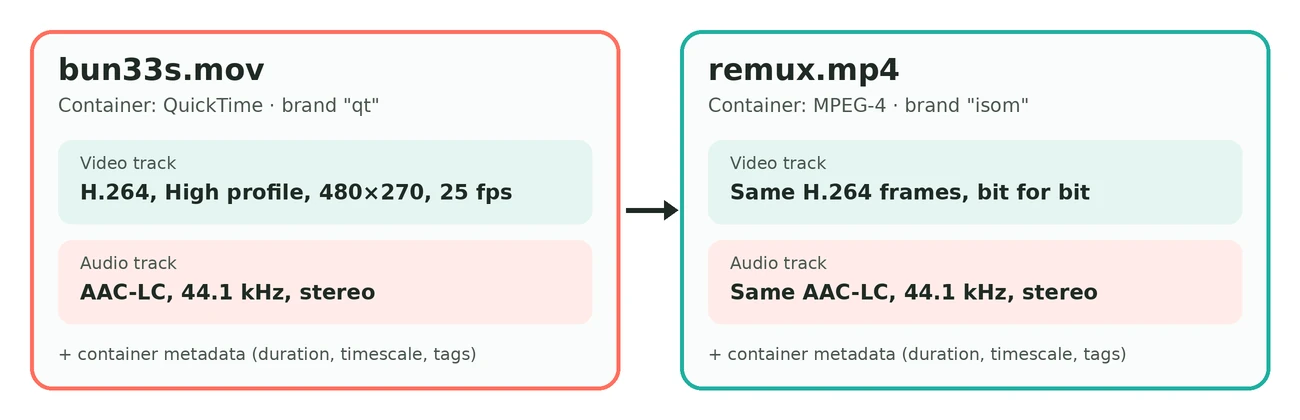
A remux only works when the codecs inside are ones MP4 handles well, like H.264, HEVC and AAC, which covers most iPhone recordings. A ProRes clip, or a MOV with uncompressed PCM audio, needs a real conversion to play widely as MP4.
MP4 is by far the more universal of the two. It's the default export for YouTube and the format nearly every phone, smart TV, editor and web player expects without setup. MP4 isn't technically better than MOV, since both are built on similar standards. It's simply the one almost every platform and device maker agreed to support, the way PDF became the default for documents no matter which app wrote them.
Common symptoms and what causes them
| Symptom | Likely cause |
|---|---|
| Plays on iPhone or Mac, won't open on Windows | Some default Windows apps don't read MOV. VLC usually fixes it, but not every recipient has it installed. |
| Uploads to some sites, rejected by others | The upload form's list of allowed types leaves out .mov, even though the video inside would be fine |
| Opens in an editor but has no sound | The editor reads the MOV container but not the audio codec inside it |
| Choppy or dropped frames on an older device | Usually HEVC video inside the MOV, which older hardware can't decode smoothly. The container isn't the problem. |
| Huge file for its length | Also not the container. It's usually HEVC at high resolution and frame rate, covered in my iPhone compression guide. |
Several of these trace back to the codec rather than the .mov wrapper. HEVC (also called H.265) compresses better than the older H.264, so newer iPhones use it by default, but many devices and browsers still handle it worse than H.264 or can't decode it in hardware. That shows up as stutter, battery drain or a flat refusal to play. A MOV can fail because of its container, its codec or both, which is why the same file behaves three different ways on three devices.
When to convert, and when to leave it as MOV
If you stay inside Apple's world (editing in Final Cut, sharing between Apple devices or archiving clips you'll reopen in iMovie), there's no reason to convert. MOV works fine there and can keep some metadata and editing-friendly details that an MP4 export may flatten. Converting would only add a step and some quality risk.
Convert when the video leaves that world: sending it to someone on Windows or Android, uploading it to a site that's fussy about formats, or attaching it somewhere you're not sure the other person's software will cooperate. MP4 is the safer choice in all of those cases, and it's better to convert before the file becomes someone else's problem, like right before their meeting starts.
One quick check helps too. If an app fails to open a MOV, drag the file into a browser tab. Many browsers will play it, which tells you the video itself is fine before you assume it's corrupted. It's not reliable enough for sharing, but it's a useful sanity check.
Converting and compressing in one step
Converting and compressing can be one job instead of two. When you run a MOV through my video compressor, the output is always an MP4. A file that was too big and hard to open comes out smaller and playable everywhere, with no separate converter and no second pass.
The same goes for a few other formats with their own compatibility gaps. Old AVI files use codecs some modern players no longer support. MKV support varies a lot between devices: fine on a computer, spotty on a smart TV or phone. WebM is a browser-native format that plenty of software outside a browser doesn't expect. Drop any of them in and you get a standard MP4, the one format almost nothing on the other end has an excuse to reject.
Frequently asked questions
Does converting MOV to MP4 lose quality?
Not if it's a remux. In my test above, every frame of the MP4 matched the MOV exactly. Quality only drops when the video is re-encoded, which compressing always does, and most free online converters compress at the same time. That's usually fine, since you often want a smaller file anyway.
Why does my MOV have no sound on Windows?
Some Windows apps read the MOV container but not the audio codec inside it. Converting to MP4 with a tool that re-encodes the audio, like SquishyFile, fixes it along the way.
Is MP4 always smaller than MOV?
No. The container barely affects size, which comes from resolution, frame rate and bitrate. A MOV and an MP4 encoded with the same settings are close in size. The difference people notice usually comes from HEVC versus H.264.
Can I just rename a .mov file to .mp4?
No. Renaming doesn't change what's inside the file, and most software will still fail to open it or show a broken video track. You need a real conversion.
Is HEVC the same thing as MOV?
No. HEVC is a codec, the way the video is compressed. MOV is a container, the way the file is packaged. A MOV often holds HEVC, but you can have HEVC in an MP4 or H.264 in a MOV. Newer iPhones just pair them by default.
What if I only want the audio from a MOV?
The video to audio converter saves the soundtrack of a MOV as MP3, WAV, M4A or OGG.
Can I shrink the file too, not just convert it?
Yes, in one pass. Drop the MOV into the video compressor, pick a compression level or a target size, and download an MP4.