What Are WebGL Shaders and How Do They Work?
The first shader I wrote drew nothing at all
For about two hours I stared at a black canvas and assumed WebGL itself was broken. The console showed no error, and nothing crashed. I'd forgotten to bind one uniform, so the GPU had every reason to draw nothing, and it did exactly that without complaint. That's how the first week with shaders tends to go. In normal programming a missing variable throws an exception you can read. With a shader, a mistake just produces silence, and you get nothing to search for.
It's disorienting because a shader works differently from a JavaScript or Python function. It's a tiny program, usually a few dozen lines, that the GPU runs an enormous number of times in parallel, and it knows almost nothing outside itself. Once that model clicks, a lot of GPU behavior that looks like magic turns out to be a simple idea repeated an absurd number of times. Real-time video effects, live filters and a game drawing a complex scene at 144 frames a second all work this way.
Two programs, two different jobs
Every WebGL draw call runs two shader programs back to back, and they do very different work.
The vertex shader runs once per vertex, a corner of a triangle, since everything a GPU draws breaks down into triangles. Its only job is geometry: given this point's input, where does it land on screen? It knows nothing about color, lighting or texture. It outputs a position, and for a single triangle it might run just three times.
Once every corner has a screen position, a fixed stage called the rasterizer works out which pixels fall inside the triangle. That part isn't programmable; it's built into the GPU's hardware. It hands every pixel it finds to the second program.
The fragment shader, called a pixel shader in DirectX, runs once for every one of those pixels, and that's where the interesting work happens: color, lighting, textures, effects. A fragment shader doesn't know it's one of two million running this frame. It receives the data interpolated across the triangle at its own location and answers one question: what color is this pixel?
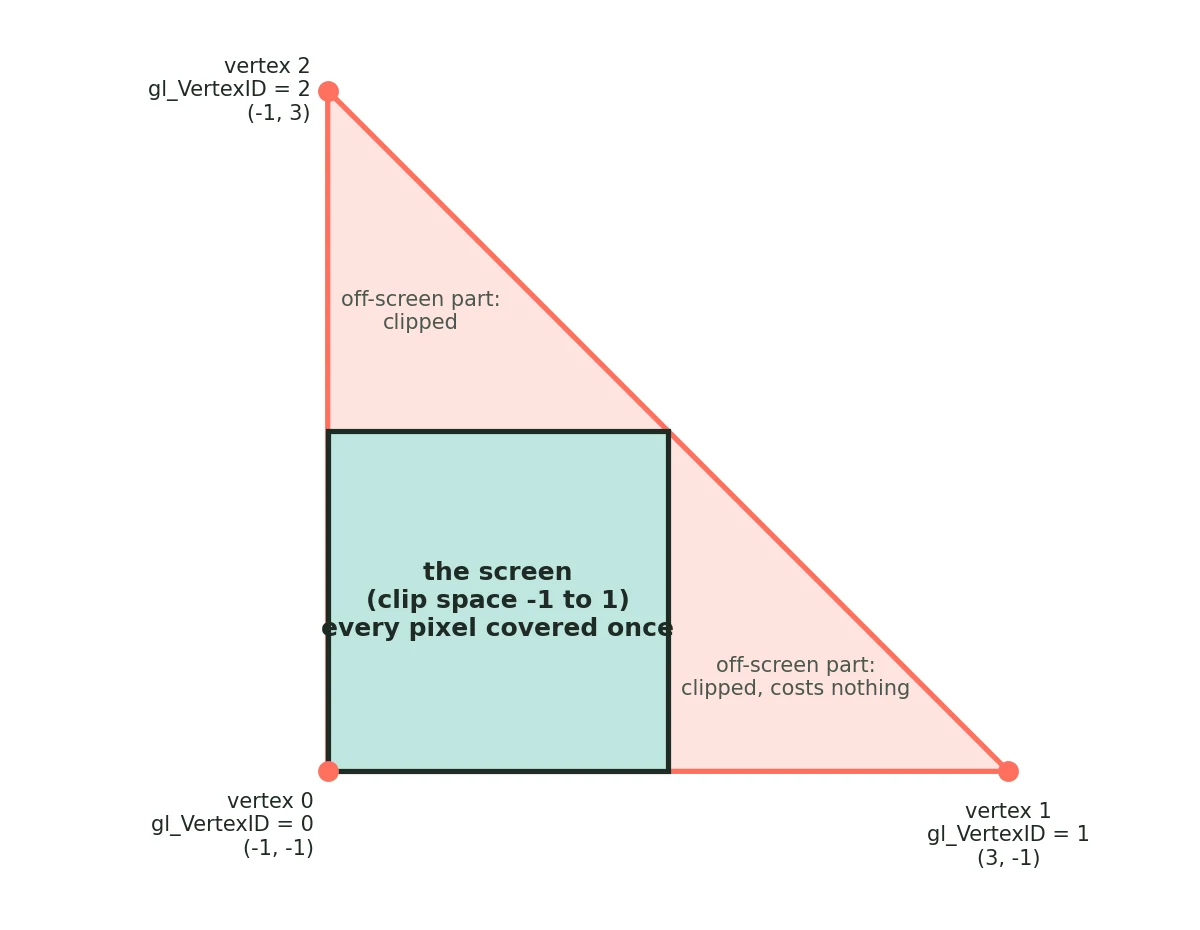
One trick feels slightly illegal the first time you see it. If you only need to process a full-screen image, which is exactly what a video filter needs, you don't need a vertex buffer, an index buffer or a real mesh. You draw one triangle, deliberately oversized so it covers the whole screen, computed from each vertex's built-in ID with no input data at all:
// A single triangle, built from gl_VertexID alone,
// big enough to cover the whole screen. No buffers needed.
void main() {
  vec2 pos = vec2((gl_VertexID << 1) & 2, gl_VertexID & 2);
  gl_Position = vec4(pos * 2.0 - 1.0, 0.0, 1.0);
  vUv = pos; // passed to the fragment shader, interpolated per-pixel
}
Three vertices, no setup, and every pixel on screen is covered exactly once. The part that hangs off the edge of the viewport gets clipped away for free. It's the standard way to run a "process this whole image" shader, and once you've seen it you notice that almost every real-time video or image effect is built on it.
How data gets into a shader
A shader that can only see itself isn't much use. It needs to read the image you're processing and the settings you want to control. GLSL gives you two ways in, and choosing the right one matters.
A uniform is a value that's the same for every pixel in a draw call. You set it once from JavaScript before drawing, and every run of the fragment shader that frame reads the same number. That's where anything a slider controls belongs: scanline intensity, grain amount, the strength of a color-fringing effect. The GPU doesn't recompute it per pixel. It's a constant, and two million pixels each read it and do something different with it based on their own position.
A texture is the other way in, and it's how the image itself arrives: the current video frame, uploaded to the GPU as a 2D grid of colors. The fragment shader doesn't loop over that grid. It samples one texel at the coordinate matching the pixel it's responsible for, using UV coordinates interpolated from the vertex shader. Want a blur or an edge detector? Sample a few neighboring coordinates instead of one and combine them. Most effects that look complicated come down to that: one texture, a few nearby samples and some arithmetic.
With uniforms for "how strong" and a texture for "which image," you can express almost any real-time filter without touching the CPU again once the frame is uploaded.
Why it's so fast
A CPU is built to run one stream of instructions very well, with a few cores doing a few different things. A GPU makes the opposite bet: thousands of much simpler cores all running the same instructions at the same time, on different data. That design is useless for most general code, which is full of branches and steps that depend on each other. It's perfect for a fragment shader, which by design never needs to know what any other pixel is doing.
That independence is the whole performance story. A 1920×1080 frame is a little over two million pixels. The fragment shader doesn't run two million times in a patient loop. The GPU sends huge batches of pixels across its cores at once, and since no pixel's result depends on another's, nothing stops them from running together. That's why a full-frame effect like color grading, a blur or color fringing finishes in a fraction of a millisecond on a GPU, while the same math in a per-pixel CPU loop visibly chugs.
It's also why shader code feels restrictive if you're used to normal programming. There's no dynamic memory, loops usually need fixed bounds, and branches that go different ways for neighboring pixels can quietly hurt performance even when the result is correct. Those rules are the price of running the same small program a couple of million times a frame, sixty times a second.
Where this shows up: real-time video and image effects
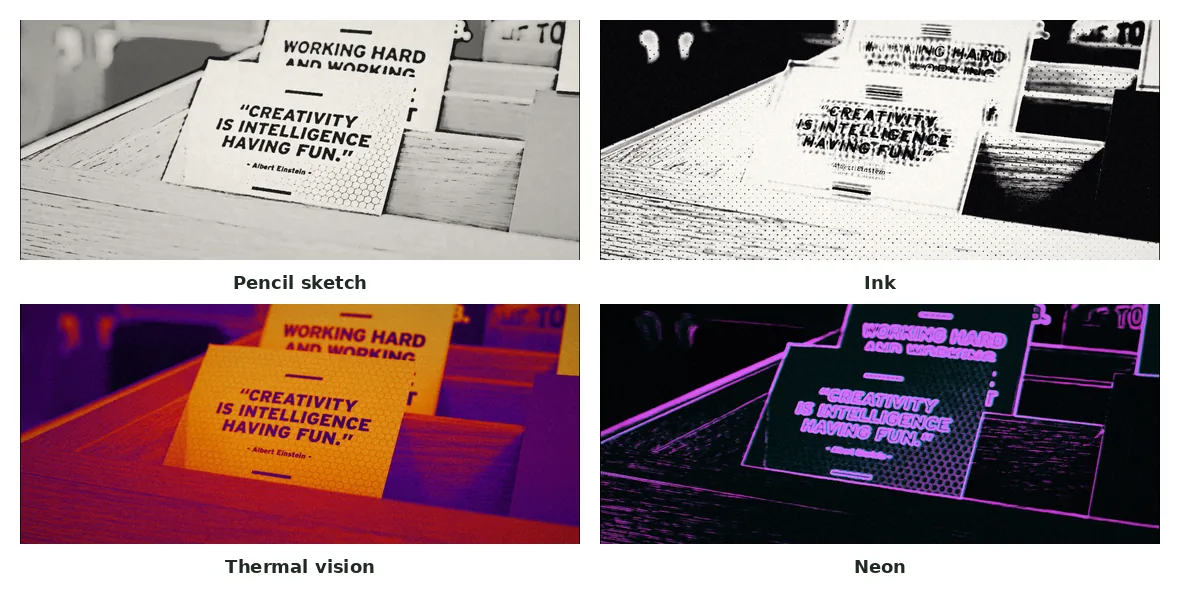
This is what made shaders click for me as more than a graphics curiosity. Take any live video effect, like scanlines, film grain, an edge-detected sketch look, a thermal false-color pass or color bleed. The practical way to do it in a browser is the full-screen triangle above: decode a video frame into a texture, run one fragment shader pass over it, and read the result out. Every pixel gets the same treatment on its own: sample a color, do some math, maybe sample a few neighbors for an edge or a blur, write the output. The GPU finishes the whole frame before the next one has even decoded.
Compare that with a JavaScript loop over a canvas's raw pixel array, one pixel at a time on the CPU. It produces the same image, but at a few frames per second on anything bigger than a thumbnail, because it throws away the one property, independence between pixels, that makes the parallel version fast. The math for many of these effects isn't complicated. A basic edge detector is a few neighbor samples and a threshold. What makes it usable in real time on a full video is running that small piece of math on hardware built for it.
Why I built a shader-based filter tool
That rabbit hole led to my video filter tool. I wanted a VHS effect, with scanlines, tape warmth and camcorder color bleed, plus a few artistic looks like pencil sketch and thermal vision, and I wanted the preview to update live as you switch styles instead of "upload, wait, hope it looks right." A CPU loop was never going to reach a watchable frame rate. A WebGL2 fragment shader running one pass per frame with the full-screen triangle above handles it easily. Switch the style, the shader runs again, and the preview updates at once, because the per-pixel math is cheap and the hardware runs all of it together.
A side effect is that your footage stays on your machine. The frame becomes a GPU texture, the shader runs on your graphics card, and the browser encodes the result back to video without any server involved. The tool has 11 styles: six VHS and camcorder presets plus pencil sketch, cross-hatch, ink, thermal vision and neon, with a live preview so you can judge each one on your own clip before rendering. I explain what each layer of the VHS look does in how VHS filters work.