

How Does a VHS Filter Work? The Tape Artifacts It Has to Fake
Most VHS filters get one thing backwards
Look closely at many VHS-effect tools and you'll spot the same tell: dropouts drawn as bright white flashes across the frame. It looks dramatic, and it's wrong. A dropout on a real tape is a spot where the magnetic oxide has flaked off or the head briefly loses contact, so the deck reads back nothing, not something bright. The correct artifact is a dark, desaturated streak, because missing signal isn't a burst of light. It's a small detail, and it's the kind that separates an effect built from how a VCR works from one built by eyeballing a few YouTube clips.
That's what this post is about. A VHS filter is really a stack of about a dozen separate simulations, each standing in for a specific piece of 1970s to 1990s analog hardware or a limit of the NTSC broadcast signal. If you know what each piece models, you can make the result look like a tape instead of a video with scanlines on it.
Why tapes looked the way they did
Before looking at how a shader fakes any of this, it helps to know what it's faking. None of these artifacts were creative choices. They were physical consequences of how analog video and magnetic tape worked.
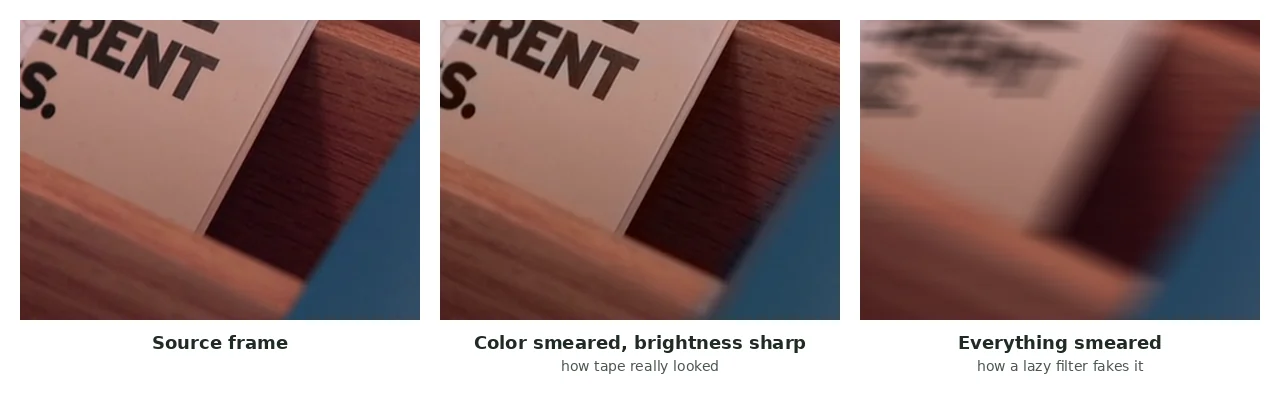
Color had far less bandwidth than brightness. NTSC composite video didn't carry brightness (luma) and color (chroma) as equal signals. Chroma rode on a narrow subcarrier on top of the luma signal with a fraction of the bandwidth, so brightness detail could be sharp while color detail was always blurry. That wasn't something VHS added; it's how the broadcast color signal was encoded, and it's why colored edges in old footage smear sideways while the shapes stay crisp. Push that chroma signal through consumer electronics with any timing wobble and you also get dot crawl and fringing at color boundaries.
Two spinning heads read the tape, and the handoff shows on screen. A VHS deck has at least two playback heads on a spinning drum, each reading part of the picture as the tape wraps around it. The switch from one head to the other happens at a fixed point in the frame, and consumer decks didn't hide it. It showed up as a torn band of static, always in the same place near the bottom. Video archivists have a name for it, head-switching noise. It's not a random glitch.
Interlaced video is two half-frames, not one. Broadcast and tape video didn't draw a full frame at once. It drew all the odd lines, then a fraction of a second later all the even ones, and relied on your eye to merge them. On a still image that works. On anything moving, the two half-images don't quite match, which produces the faint combing along moving edges that reads as "old video" even in a screenshot.
The tape couldn't hold much detail, and it wore out with each pass. Consumer VHS resolved around 240 lines of horizontal detail, clearly softer than the source. Add a worn tape, or a deck reading a slightly different path than the one it recorded, and you get horizontal jitter, the occasional vertical roll, and dropouts where the oxide is gone.
All of this is the spec a shader has to meet if the result is going to look like it came off a tape rather than out of a preset menu.
How each artifact gets faked
A real-time filter can't simulate tape physics. It has no oxide, drum or subcarrier to work with. What it can do is reproduce the visual signature each physical process leaves, cheaply enough to run every frame. These are the main effects in a VHS filter and what each one stands in for:
Color fringing
The red and blue channels are sampled a few pixels apart in opposite directions while green stays put. That literal channel split mimics the misalignment a chroma subcarrier on a separate signal path produces. A second, separate fringe grows toward the frame edges to mimic cheap lens glass rather than tape electronics. Those are two different causes, so a convincing filter fakes them separately instead of turning up one slider.
Color bleed
Only the color information gets smeared sideways across several pixels, while brightness stays sharp. That split is deliberate. It simulates chroma having far less bandwidth than luma, which is also why color bleed and sharp detail sit side by side in the same frame on a real tape.
Tracking glitches and jitter
A band drifts slowly down the frame. Rows inside it get thrown sideways hard, and rows outside get a much smaller wobble. It models a playback head reading a slightly wrong path, with the band marking where the mistracking is worst at that moment.
Interlacing shimmer
Every other scanline gets nudged a fraction of a pixel sideways from its neighbor. It's a cheap stand-in for two time-offset half-frames woven together, without rendering two separate fields.
Dropouts
Short, random streaks on scattered lines turn dark and colorless, not bright. A dropout is signal the head failed to read, so dark and desaturated is the physically correct direction.
Head-switching noise
A fixed band of static sits at the bottom of the frame and never drifts. That fixed position matters: on a real deck the head switch happens at the same point every frame, so noise in the same spot is what looks authentic.
A few more layers exist to sell the feel of tape and film rather than any single named defect: a warm glow around bright highlights (halation, which is different from a neutral bloom), a slow warm light leak drifting across the frame, a split-tone grade with cool shadows and warm highlights, and a horizontal-only softening that mimics tape's limited resolution without touching color. None of these were named VHS artifacts the way dropouts and head-switching noise were. They're cinematic finishing touches on top of the tape simulation, closer to a film grade than a fault.
Why "VHS filter" is really six filters
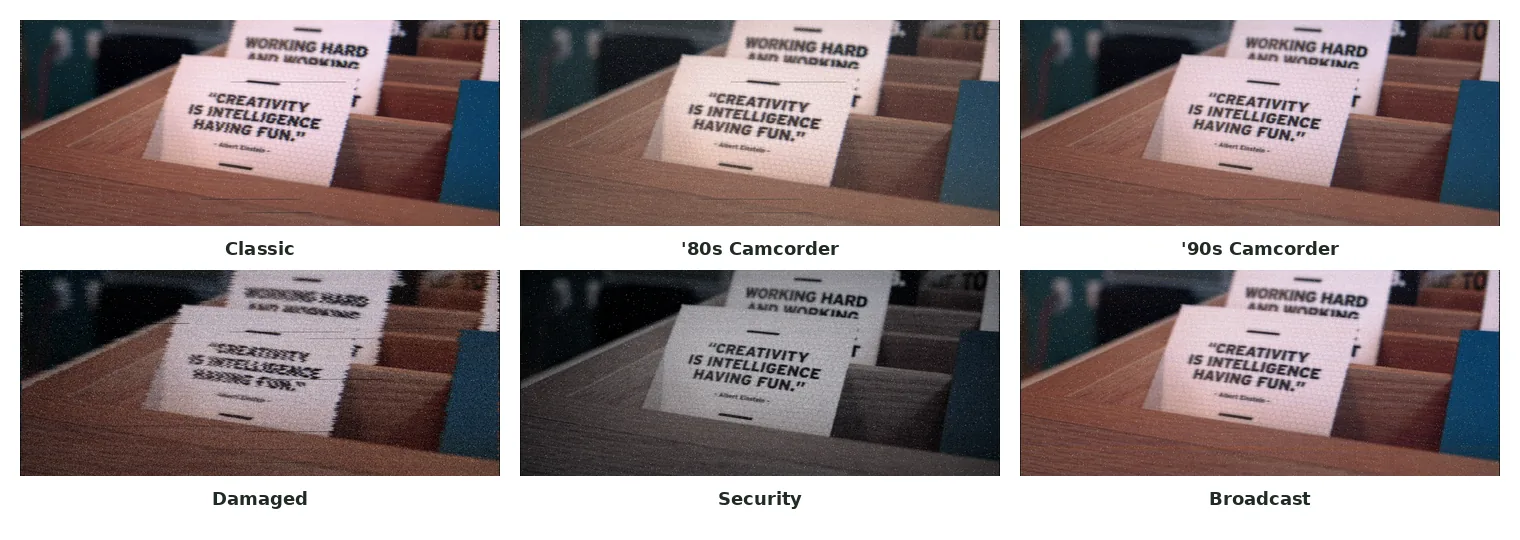
This is easy to miss if you've only seen a single "VHS" toggle. A convincing tape effect isn't one look with an intensity slider. A 1983 camcorder, a 1994 home deck, a worn rental tape and a CCTV monitor are different pieces of equipment that fail in different ways. A filter that treats them all as "VHS, but stronger" misses what makes each recognizable.
Classic
The balanced "old tape" default: moderate scanlines, moderate color bleed and a light warm tint, with nothing pushed to an extreme.
'80s Camcorder
Washed out and warm, with saturation pulled down hard, a strong vignette and an amber burned-in timecode like the displays early handheld camcorders stamped onto recordings.
'90s Camcorder
The same family of artifacts, but cleaner: less jitter, steadier tracking, more saturation, and a white and green timecode instead of amber, matching the less degraded home decks of a decade later.
Damaged
Every tape-wear artifact pushed far beyond the other presets: jitter about three times the classic default, aggressive tracking glitches and the most dropouts of any preset. No timecode on purpose, since a worn, unlabeled tape wouldn't have a clean overlay.
Security
Almost colorless and cold rather than warm, with heavy scanlines and vignette but no dropouts and no roll. That's deliberate: a CCTV monitor feed isn't a head reading a physical strip, so it has none of the artifacts that come from tape wear.
Broadcast
The heaviest color bleed of any preset, plus a slow signal roll, and again no dropouts. It models over-the-air or cable interference rather than a physical tape, so it shares the tape's color problems and skips everything that needs an actual reel.
The security and broadcast presets show why this matters. Both look degraded, but neither has dropouts, because dropouts need a physical tape shedding oxide, which neither a live camera feed nor a broadcast signal has. Getting that right is what makes six looks feel different instead of one filter reskinned six times.
Why it runs live in your browser
None of this is hard math for a computer. It's arithmetic on pixel colors. The interesting part is doing it fast enough to redraw the preview instantly as you switch styles, on a full video, without uploading a frame. That's a job for a GPU fragment shader, not a JavaScript loop. Every pixel gets the same stack of small calculations, independently of every other pixel, which is exactly the workload a GPU is built to run in parallel. If the "why a GPU" part interests you, how WebGL shaders work explains why an effect like this is cheap on a GPU and would crawl on a CPU.
In practice, your browser decodes the frame, the shader runs on your own graphics card, and the browser encodes the result, all inside the tab.
Frequently asked questions
Is a VHS filter just scanlines?
No. Scanlines are one of about a dozen effects layered together, along with color bleed, color fringing, tracking jitter, interlacing shimmer, dropouts, head-switching noise and a color grade. Scanlines alone look like lines on a video, not like tape.
Why do VHS effects make everything warm?
Partly a warmth shift that models how tape reproduced color, and partly a separate split-tone grade that pushes warm tones into highlights and cool tones into shadows. That grade is a common film trick, layered on top of the tape simulation.
Why do some VHS presets have no dropouts?
Dropouts model physical tape wear, oxide missing from the tape. A preset that models a live camera feed or a broadcast signal has no tape to wear out, so it leaves dropouts off entirely instead of faking them weakly.
Does a VHS filter need a powerful computer?
It needs basic GPU acceleration, which almost every modern laptop and phone has, including integrated graphics. The effect is a light per-pixel shader pass so it can preview live instead of making you render and wait.
Why does the timestamp look different between presets?
It matches real on-screen displays from different eras: amber digits on early-80s camcorders, white and green on 90s decks, and plain white on CCTV monitors.
Try it
The best way to see this is on your own footage. My video filter tool runs all six analog presets, plus five artistic styles (pencil sketch, cross-hatch, ink, thermal and neon), as a live preview in your browser, so you can compare classic, damaged and security on the same clip before rendering. I built it as a shader so it could run on your own machine and update instantly.