

SquishyFile vs VidCrush: Which Free Video Compressor Is Better?
VidCrush is the compressor I see most often when I search for the same things people use SquishyFile for: getting a video under Discord's limit, under WhatsApp's 16MB, or small enough to email. Both tools are free, neither has a paid plan, and both hand you an H.264 MP4 at the end. On paper they're close.
I built SquishyFile, so read this knowing I'm not neutral. I took every VidCrush fact below from VidCrush's own homepage and FAQ as of October 2026, and every SquishyFile fact from what my code actually does. Where VidCrush does something better, I say so.
SquishyFile vs VidCrush at a glance
| SquishyFile | VidCrush | |
|---|---|---|
| Where compression happens | In your browser, on your device | On VidCrush's servers (FFmpeg) |
| Uploads your video | No | Yes |
| Max file size | None set, limited by your device | 500MB |
| Exact size target | Type any MB, or tap a preset | Platform presets, or fit to limit |
| Quality levels | Light, Balanced, Max squish | Light, Medium, Maximum |
| Output | H.264 MP4 | H.264 MP4 with AAC audio |
| Input formats | MP4, MOV, MKV, WebM plus about 20 older ones | 20+, including AVI, WMV, FLV |
| Account needed | No | No |
| Paid plans | None | None |
| File kept on a server | Never sent to one | Up to 1 hour |
How they work
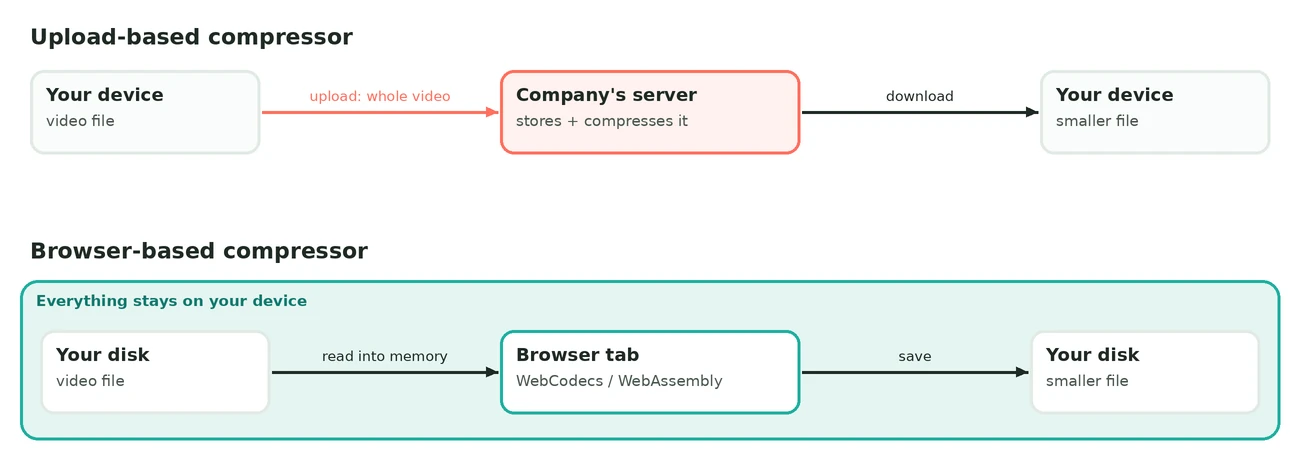
VidCrush's FAQ says it runs FFmpeg with H.264 encoding on the server side, inside isolated containers. Your browser uploads the video, VidCrush's machine re-encodes it, and you download the smaller copy. Its homepage also says the tool runs in your browser, which I read as describing the interface, since the FAQ is clear about the server doing the encoding.
SquishyFile does the encoding inside the browser tab. The page loads an encoder and your device compresses the video through the browser's WebCodecs API, using the hardware video encoder most laptops and phones already have. For older formats WebCodecs can't open, like AVI, WMV or FLV, it switches to a WebAssembly build of FFmpeg. Nothing gets uploaded at any point.
File size limits
VidCrush caps uploads at 500MB per file. That covers most phone clips, but a few minutes of 4K from a recent phone or a GoPro goes past it quickly. A 10-minute iPhone recording at 4K and 60fps lands around 4GB, so VidCrush can't take it at all.
SquishyFile doesn't set a cap. It doesn't upload anything, so I'm not paying for server storage per file. Your device's memory sets the real ceiling. A very long 4K file on an old phone can fail, and in that one case a server has the edge, as long as the file fits under its limit.
Winner: SquishyFile, by a wide margin for anything over 500MB.
Hitting a target size
Both tools are built around the same idea: you have a limit in MB and you want the video under it.
VidCrush gives you platform presets (Discord 20MB, WhatsApp 16MB, Email 25MB, Telegram 2GB and more) plus a "fit to limit" mode that aims just under the cap. It also has separate pages for fixed sizes from 8MB up to 2GB. Its homepage explains the maths openly: it divides the size budget by the clip length to get a bitrate, so a 60-second clip with a 20MB budget gets about 2.5 Mbps of video plus 128 kbps of audio, and it uses two-pass encoding to spend more bits on motion.
SquishyFile works the same way under the hood, with one difference I care about. In Exact size mode you can type any number, like 9.5 or 37, instead of picking from a list. It aims slightly under your number, measures the real output, and runs another pass if the file still came out too big. If your target is bigger than the file, it tells you there's nothing to compress. There are also dedicated pages for the two sizes people search for most, the 8MB video compressor and the 10MB video compressor.
Winner: tie. VidCrush has more platform presets, SquishyFile lets you type any size and double-checks the result.
Quality settings
VidCrush's three levels are Light (about 45 percent smaller), Medium (about 75 percent smaller) and Maximum (about 90 percent smaller). It also scales sources to 1080p when that gives a sharper result for the size, and it suggests downscaling 4K to 1080p for tight limits like Discord or email.
SquishyFile has three levels too. Light keeps the picture sharp, Balanced is the middle ground for sharing, and Max squish caps the output at 720p for the smallest file. In exact-size mode it drops the resolution on its own when your target is too small to keep the original resolution looking clean, and it shows a note when it does that.
Neither tool lets you pick a resolution by hand or switch to H.265. Both stick to H.264 because it plays on practically everything.
Winner: tie. The two approaches are close enough that the source video matters more than the tool.
Speed
With VidCrush, your upload speed decides most of the wait. A 400MB file is about 3,200 megabits, so on a connection that uploads at 10 Mbps you wait over 5 minutes before encoding even starts, then you download the result. Home internet usually uploads far slower than it downloads, which is the number people forget.
With SquishyFile there's no transfer at all, so your device sets the pace. A recent laptop or phone with a hardware encoder gets through a typical clip quickly. An old, low-power computer takes longer on long 4K files, and VidCrush's servers don't care how old your computer is.
Winner: depends on your setup. Slow upload and a decent device favours SquishyFile. Fast upload and a weak device favours VidCrush.
Privacy
VidCrush says uploads travel over HTTPS, get processed in isolated containers and get deleted within an hour, and that it never views, shares or stores your content. That's a reasonable policy, and I have no reason to doubt it.
It's still a promise about a copy of your video sitting on someone else's server for up to an hour. With SquishyFile there's no copy to delete in the first place. If you want to check that claim yourself, for my tool or any other, I walk through a 30-second test in is it safe to compress a video online.
Winner: SquishyFile, especially for client footage, family videos or screen recordings with personal details in them.
Extras
VidCrush has a lot of supporting content: 16 platform guides (Discord, Telegram, Slack, Zoom, Reddit and more), a reference table of video size limits for 30+ platforms, and a Russian version of the site. If you're not sure what a platform allows, that table is genuinely handy.
SquishyFile is a wider toolbox rather than a single compressor. The same site has a video file size calculator for checking how long a clip can run at a given size before you compress, plus converters, a GIF compressor and an AI video upscaler, all running in the browser the same way.
Winner: VidCrush for platform guides, SquishyFile if you want other video tools in the same place.
The scorecard
| Round | Winner |
|---|---|
| File size limits | SquishyFile |
| Hitting a target size | Tie |
| Quality settings | Tie |
| Speed | Depends on your connection and device |
| Privacy | SquishyFile |
| Extras | Split |
Which one should you use?
Use VidCrush if your computer or phone is old and slow, your upload speed is good, and the file is under 500MB. It's a solid, honest tool and the platform guides are useful.
Use SquishyFile if the file is over 500MB, your upload speed is slow, you want to type an exact size like 9MB for a strict limit, or it's footage you'd rather keep on your own device.
Either way, compress from the original file, not from a copy you already compressed, because every re-encode adds new loss on top of the old. I measured how quickly that piles up in how many times you can compress a video. And if a long video has to fit a tiny limit, it'll look soft in any tool. My video bitrate chart shows what each resolution needs to look decent.
If you have a video that's too big right now, try SquishyFile's video compressor and type the size you need.