

MP3 Quality Explained: 128, 192 or 320kbps, Which Should You Use?
The default-to-320 instinct isn't quite right
When a converter asks you to pick 128, 192 or 320kbps, the biggest number feels like the safe answer. More must be better, and storage is cheap. That instinct isn't exactly wrong, but it skips the question that matters: how much quality does this particular audio have to lose? A voice memo converted at 320kbps isn't better than the same memo at 128kbps. It's the same quality in a file about two and a half times bigger, padded with detail that was never there.
What kbps measures
Kbps means kilobits per second, how much data the MP3 spends on each second of audio. It's a budget, not a quality tier. At 320kbps the encoder can spend 320,000 bits on every second of sound; at 128kbps it gets 128,000 bits for the same second. A bigger budget lets the encoder keep more of what's in the source, but only while there's real detail left to keep. Past that point, the extra budget has nothing to spend on.
That trips a lot of people up. Bitrate caps how much detail can be kept; it doesn't create detail. Scan a blurry photo at a higher resolution and it doesn't get sharper, it just shows the same blur in more pixels. MP3 bitrate works the same way relative to the audio already in your video.
The source audio sets the ceiling
The audio in almost every video is already compressed. Phones, screen recorders and most cameras encode the sound at a moderate bitrate as they save it, just like the picture. If the original audio was saved at, say, 128kbps AAC, converting it to a 320kbps MP3 can't bring back detail lost before you touched the file. It re-encodes a limited source into a bigger file, which sounds the same as the smaller one.
I checked this on the soundtrack of a 33-second clip from Big Buck Bunny, music and sound effects stored as 128 kbps AAC, which is typical for video. I converted it to MP3 at 128, 192 and 320 kbps with LAME, the standard MP3 encoder, and measured how far up the frequency range each file still carried sound:
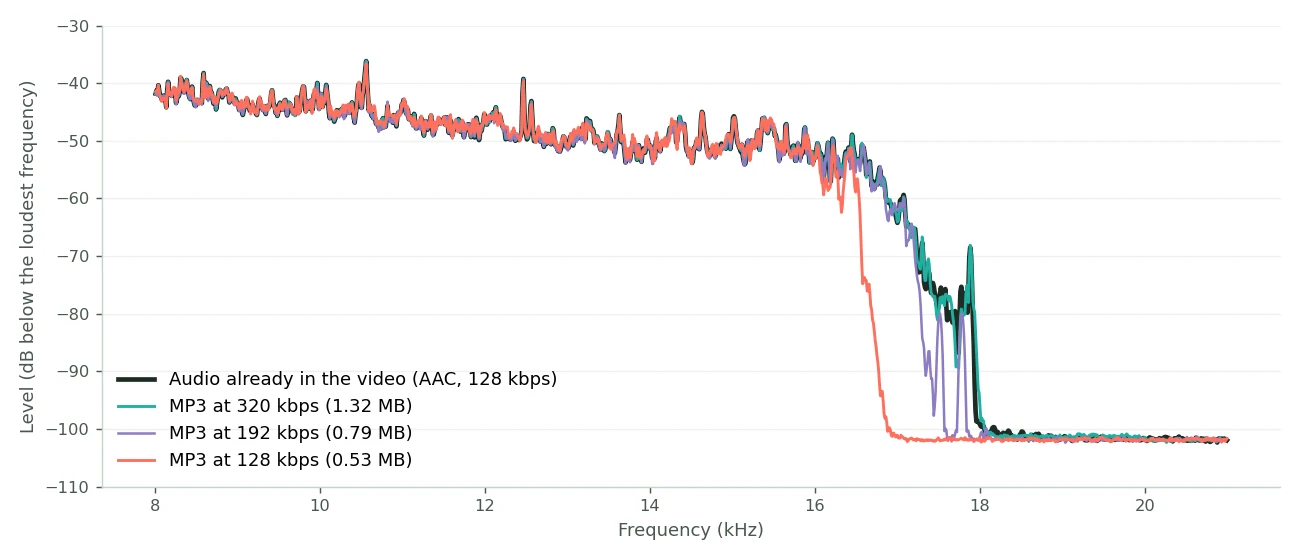
The source had nothing above about 17.9 kHz, because its own AAC encoder had already cut the top off. The 320 kbps MP3 reached the same 17.9 kHz and stopped there, with nothing higher to keep, while weighing 1.32 MB against 0.53 MB for the 128 kbps file. The 128 kbps version cut off at about 16.6 kHz, a range many adults no longer hear, and below that the three MP3s matched the source almost exactly.
You notice this most with screen recordings and phone video, where the audio is rarely pristine. It matters less for music or performances recorded on better equipment, where the source usually has more real detail for a higher bitrate to keep.
Matching the bitrate to what's in the audio
Let the content decide the number, not a general sense of "quality."
| What's in the audio | Bitrate | Why |
|---|---|---|
| Speech: lectures, interviews, voice memos, podcasts | 128 kbps | A voice covers a narrow frequency range, and more bits keep detail the ear can't hear in speech |
| Mixed: narrated screen recordings, video with background music | 192 kbps | Room for the music without doubling the file for the talking parts |
| Music or live performance | 320 kbps | Music has far more frequency detail and dynamic range, which lower bitrates audibly flatten |
Treat these as a starting point, not hard rules. They're based on where extra bitrate makes an audible difference. A 320kbps podcast isn't wrong; it just spends bits on detail no listener will notice.
Mono, stereo and where the bits go
Bitrate is shared across the file's audio channels, which is easy to overlook. A stereo file at 128kbps spends roughly 64kbps per channel, while a mono file at 128kbps spends the whole budget on its one channel. So if the source is already mono, as most phone voice memos, many screen recordings and some older camera audio are, turning it into stereo adds nothing. It spends half the budget storing a copy of the same signal. For a mono source, a mono MP3 gets more quality out of the same bitrate.
The opposite case comes up too. Some recordings carry 5.1 surround or other multi-channel audio. MP3 supports at most two channels, so that audio gets folded down to stereo during conversion whatever bitrate you choose. If a converted file sounds like it's missing a channel, that's the MP3 format's limit, not a setting you missed.
When MP3 itself is the limit
Past a certain point, the format caps quality, not the bitrate. MP3 is lossy at every bitrate. Even at 320kbps it discards some audio the ear is unlikely to notice, just less than at lower bitrates. For almost everything (sharing a recording, listening on headphones or a phone, archiving a voice memo) that doesn't matter. It only matters for audio production: mixing, mastering or any work where you process the file further and small artifacts pile up, just like re-compressing a video. For that, export WAV instead so you don't stack lossy passes. My video to audio converter exports WAV as well as MP3, M4A and OGG.
A quick way to decide
If you're not sure what's in the audio, think about where it came from. A voice memo, a Zoom call, a recorded lecture or an interview is speech: 128kbps. Narration over music, or a screen recording with background sound, is mixed: 192kbps. A performance, a DJ set or footage recorded because the music matters is music: 320kbps. When you really can't tell, 192kbps is a middle ground that's rarely the wrong call.
Frequently asked questions
Will 320kbps ever sound worse than 128kbps?
No. A higher bitrate never sounds worse. It can only be pointlessly bigger when the source has no extra detail to keep.
Can I hear it if I picked too low a bitrate?
For speech, the difference between 128 and 320kbps is hard to hear on normal equipment. For music, 128kbps can sound flatter or duller than 320kbps, especially on headphones. That's where the choice matters.
Does converting at a higher bitrate than the source improve the audio?
No. It can't recover detail the source never had. You get a bigger file with the same underlying quality.
Which converter should I use, video to audio or MP4 to MP3?
Both extract audio the same way. Use video to audio for MOV, MKV, AVI or WebM files, or when you want WAV, M4A or OGG. Use MP4 to MP3 when you have an MP4 and just need an MP3.
Is my video uploaded anywhere when I convert it?
No. Extracting and encoding the audio both happen on your device, the same as the video compressor. My guide to browser-based processing shows how to check that yourself.
Should I keep the original video after converting to MP3?
Yes, if you might want a different bitrate later or the picture matters for something else. Converting doesn't change or delete your original either way.