

How Browser-Based Speech-to-Text Works (And What It Can't Do)
The upload step nobody questions
Search "transcribe mp4 to text" and almost every result works the same way. You drop in a file, wait while it uploads, wait again while a server processes it, then download the text. The flow is so standard that few people think about what it means: for a few minutes, a recording that might hold a client call, a personal voice memo or an internal meeting sits on hardware you don't control, to produce text that could in principle have been made on your own machine.
A newer kind of tool skips the upload. Transcription happens inside the browser tab, with a speech recognition model running through WebAssembly instead of a call to a server. You don't wait in anyone's queue, and your file doesn't end up sitting in a storage bucket afterward.
Real AI speech models running in a browser tab on whatever laptop you have sounds like it shouldn't work. It does work, and how it works also explains its limits.
What speech recognition does
Automatic speech recognition (ASR) turns a raw audio waveform into text. Most modern systems do it in two stages. An encoder listens to a stretch of audio and builds a numeric summary of the sounds it heard, not words yet, just the acoustic content. A decoder reads that summary and writes text one token at a time, each token based on the audio and on what it has already written. It's a bit like predictive text, driven by sound instead of typing.
It's a hard problem wherever it runs. Accents vary, background noise varies, people talk over each other, trail off and mumble, and microphones range from studio quality to a phone across a table. A model that copes with all that has usually heard an enormous amount of varied speech in training, which is a big reason the best general speech models are large, often hundreds of millions of parameters or more.
And model size is exactly what decides whether something can run in a browser tab.
Why this used to need a server
Running a model with a few hundred million parameters is routine on a data center GPU built for it. Running the same model on whatever CPU or integrated graphics sits in a visitor's laptop, inside a browser sandbox, with no guarantee of special hardware, used to be out of the question. The compute wasn't there, and browsers had no fast, portable way to run AI model math anyway.
That second part is what changed. WebAssembly lets code written in languages like C++ or Rust run in a browser at close to native speed, far faster than plain JavaScript for the same math. That's what made local AI in a browser viable. It didn't shrink large models, but it made execution fast enough for a small model to run in real time.
WebAssembly doesn't rescue a model that's too big. A browser tab running an oversized model still crawls or runs out of memory, however efficient the math is. So the constraint is still there: the model has to fit.
The trade-off nobody puts in the headline
What "run AI locally in your browser" pitches usually leave out is that a model small enough for a browser tab isn't as capable as the biggest cloud speech models. It's built on a much tighter budget, tens of millions of parameters instead of hundreds of millions, small enough to load quickly and run in real time on ordinary hardware, often without multi-threading, since browsers can't always offer it.
That's a real, structural trade-off. A smaller model generally won't match a huge cloud model on every edge case: very heavy accents, very noisy recordings, unusual phrasing. In exchange, it runs entirely on the device that opened the page, with no round trip and no queue.
It also explains something to watch for when you compare tools. Browser-based transcribers tend to support a short, specific list of languages instead of the "100+ languages" some cloud APIs advertise. Every extra language is more weight the browser has to download and run, and there's no data center of GPU memory to lean on. A good tool tells you exactly which languages it covers. My MP4 to transcript tool covers English, Spanish, Japanese, Chinese and Korean, because those are the languages its model runs reliably at a size a browser can handle.
What happens when you drop in a file
The mechanics explain a couple of quirks that are easy to mistake for bugs.
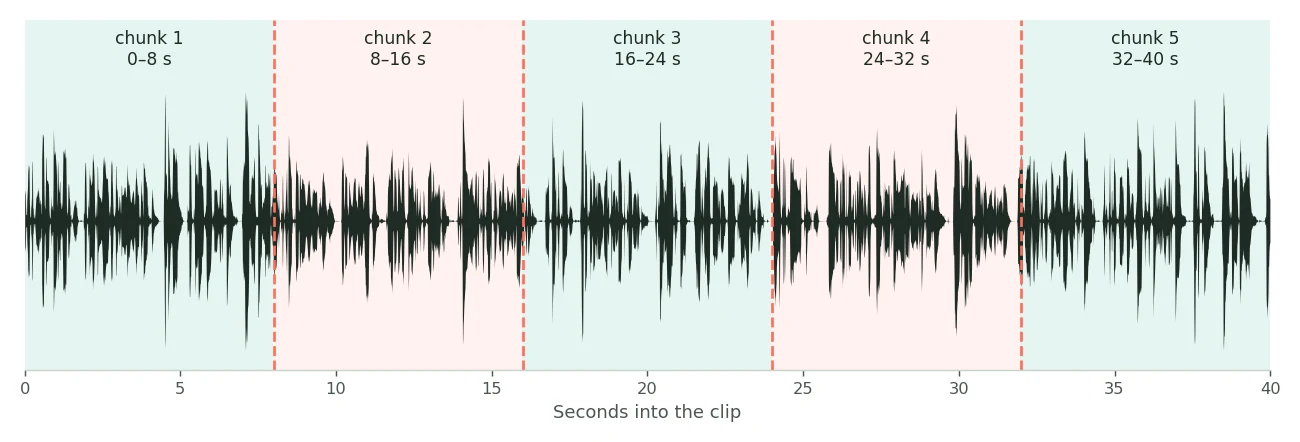
The file isn't transcribed in one pass. My MP4 to transcript tool cuts the audio into 8-second chunks and transcribes them one at a time. That keeps memory use and processing time predictable whether the file is thirty seconds or ninety minutes long, which matters much more on a visitor's laptop than on a server with room to spare.
Chunking also causes one real limitation. Each chunk is transcribed with little awareness of the audio right before or after it, so a sentence that lands exactly on the boundary between two chunks sometimes comes out rough: a dropped word, or an odd break mid-phrase. It doesn't affect most of the transcript, but it's a real trade-off. Cloud systems that see the whole file with full context around every word don't have this problem, in exchange for the file leaving your device.
The upside is that there's no ceiling tied to server load or usage limits. A file never waits for someone else's GPU to free up. A longer recording just takes longer on your own hardware, and that's the only real constraint.
Once the text is done, a useful tool lets you take it in more than one shape: plain text for reading, searching or pasting into a document, or a timed caption format like SRT or VTT if it has to sync with a video. That's worth caring about, because a transcript and timed captions solve different problems, and a tool that outputs only one has quietly decided which job it does.
Browser-based vs. cloud transcription
Neither is better across the board. They're built around different constraints, and the right one depends on the recording and what you need from it.
Browser-based usually fits better when
The audio is sensitive, like a client call, an internal meeting or a personal recording you'd rather not hand to a third-party server even briefly. The file is large and you don't want to sit through an upload before anything starts. Your language is one the local model supports, and you don't need top accuracy on heavy accents or very noisy audio. You want the transcript now, without depending on someone else's server capacity.
A cloud service usually fits better when
You need a language the local model doesn't cover. The audio is hard, with lots of background noise, several people talking over each other or unusual accents, where a bigger model's extra training shows up as better accuracy. You need features that depend on much larger models, like reliably telling many speakers apart. Or the content isn't sensitive, so the privacy trade-off costs you nothing.
Most everyday transcription (a recorded meeting, a lecture, a podcast episode, an interview for an article) fits the first group. The cases that truly need a big cloud model are real but narrower than transcription marketing suggests.
Where the privacy claim holds up
"Privacy-friendly" gets used loosely, so I'll be specific. With a browser-based tool there's no upload to trust. The browser reads the file, a local model processes it, and the text comes back without any network request carrying the audio. That's a different kind of guarantee from "we delete your file after 24 hours" or "we don't keep recordings." Those are policies. The file still has to leave your device once, and you have to trust the other side follows the policy.
It matters most for the audio people are most careful with: a meeting about internal business, a personal voice memo, an interview given with some expectation of confidentiality, or any recording of someone else's voice that isn't obviously yours to upload. With no server in the loop, none of that becomes a judgment call.
Common problems with on-device transcription
A word occasionally drops at a chunk boundary
This is the chunking trade-off described above. It's rare, and it happens at the exact second one chunk ends and the next begins.
Your language isn't supported
Local models cover a limited set of languages because each one adds weight. If yours isn't on the list, a tool that covers it, even one that processes on a server, is a better answer than forcing a model to handle a language it wasn't trained for.
Heavy accents or noisy audio cost more accuracy than with a big cloud model
That follows from model size. A smaller model has seen less varied training data, so it has less to fall back on when the input is hard.
Long files take longer, but don't fail
With no server-side size limit, a ninety-minute recording is a matter of time, not a rejected upload. Here local processing is more forgiving than a typical cloud API's size cap.
A file with no audio gives an error, not silence
A video with no usable audio track, or one the browser can't decode, should say so plainly instead of returning an empty transcript. If a result comes back blank, check for that first.
Try it on a real file
The quickest way to understand all this is to run a file through it. My MP4 to transcript tool does exactly what this article describes, inside your browser, with nothing uploaded. It covers English, Spanish, Japanese, Chinese and Korean and exports plain TXT or timed SRT and VTT. It has no size cap; a long recording just takes longer.
For German, French, Italian, Polish, Russian, Ukrainian and a few other European languages, my video to text tool uses a different multilingual model that covers ten languages without a language setting.
Frequently asked questions
Is browser-based speech-to-text as accurate as cloud transcription?
It depends on the audio. On clear speech in a supported language it holds up well. On heavy accents, lots of noise or overlapping speakers, bigger cloud models usually do better, because they're larger and trained on more varied data.
Why do local transcription tools support only a few languages?
The model has to be small enough to download and run in a browser tab in real time, and every extra language adds weight. So these tools support a chosen list instead of the huge coverage some cloud APIs offer.
Is my file really never uploaded?
With a truly browser-based tool, yes. Your browser reads and processes the audio itself, so there's nothing for a server to delete later, unlike a cloud tool that promises to remove your file quickly.
Why does the transcript sometimes drop a word mid-sentence?
The audio is processed in short chunks to keep memory use predictable on ordinary hardware. Now and then a sentence crossing the boundary between two chunks comes out slightly rough.
Is there a file size or length limit?
Not a hard one, since the work runs on your device instead of against a server quota. Longer files just take more time.
Should I use a browser-based tool or a cloud service?
For sensitive recordings, large files or a supported language, browser-based usually fits better. For other languages, or hard audio where a bigger model's extra training helps, a cloud service is the more reliable choice.