

How Many Times Can You Compress a Video Before It Looks Bad?
Why the result looks worse than it should
You compress a video and it comes out blockier or softer than you expected, even on a setting meant to stay close to the original. Most of the time, the file you fed in wasn't the original. It was already a compressed copy, and you compressed it a second time without knowing.
This happens all the time, because the first compression usually isn't something you choose. You record a video, a messaging app or social platform re-compresses it when you send or upload it, you download that version later, and then you run it through a compressor to fit a size limit somewhere else. By the end, the video has had two or three rounds of lossy compression stacked on top of each other, and each round removes more than the last.
Why the loss grows instead of staying flat
Each time a video is compressed, the encoder decides which detail to keep and which to drop, based on what it sees in that file at that moment. The first pass drops real picture detail: fine texture, subtle gradients, small color variations. That's the least noticeable place to save space when the source is clean. Later passes don't have that untouched detail to work with. The encoder now sees a file with some blockiness and softness already baked in, and it has to make the same kind of decisions again with less real information left.
It gets worse than "a bit more loss each time." Some of what the second pass treats as picture detail is really leftover damage from the first one: blocky edges around a face, banding in a sky, a faint checkerboard in a dark scene. The encoder can't tell those artifacts apart from the original footage, so it spends bits preserving them, which leaves even less for the parts of the image that matter.
Photocopying a photocopy works the same way. The first copy loses a little sharpness at the edges of the text. Copy that copy and you build on the loss that's already there, and the machine can't tell which smudges came from the first copy and which were on the original page. Video behaves like that, with motion and color instead of ink.
What five re-encodes did to one clip
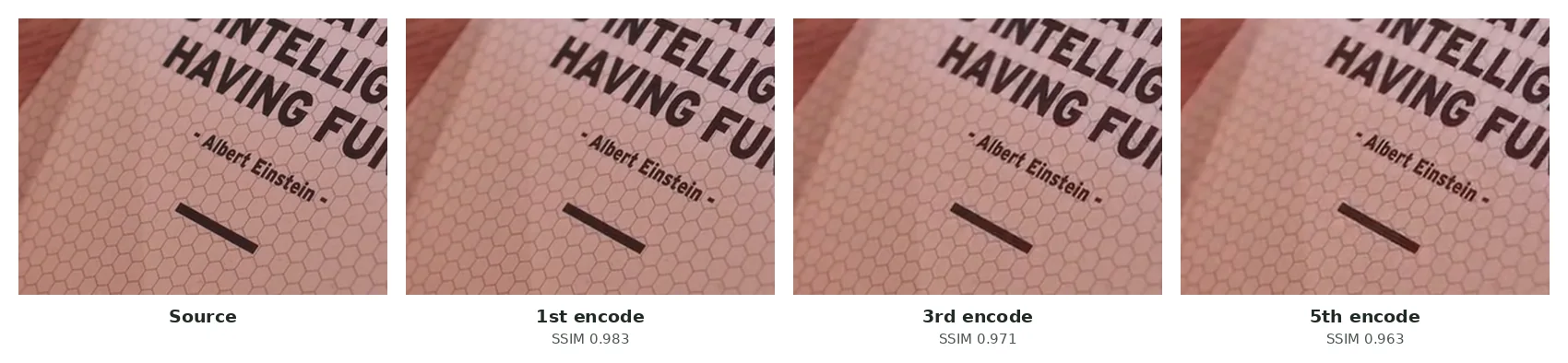
I wanted numbers rather than a metaphor, so I took an 8-second 720p clip of printed cards (a free Pexels video), made a near-lossless master copy, and ran it through five encodes in a row with FFmpeg's x264 encoder. Every pass used identical settings: 1.5 Mbps, about what a messaging app spends on 720p. After each pass I compared the result with the master using SSIM, a standard similarity score where 1.0 means identical.
| Encode | File size | SSIM vs. master | PSNR vs. master |
|---|---|---|---|
| 1st | 1.54 MB | 0.983 | 43.5 dB |
| 2nd | 1.64 MB | 0.976 | 41.5 dB |
| 3rd | 1.64 MB | 0.971 | 40.4 dB |
| 4th | 1.65 MB | 0.966 | 39.6 dB |
| 5th | 1.65 MB | 0.963 | 38.9 dB |
Two results surprised me. First, the score dropped on every single pass, with no point where it leveled off. Second, the file never got smaller. After the first pass it grew by about 6% and stayed there, because the encoder spent its budget faithfully reproducing blur and blocking the earlier passes had left behind. Re-compressing at the same settings costs quality and saves nothing.
Where the extra passes sneak in
1.Recording
Phones and screen recorders compress footage as they save it. That file is your real original, and it has already been encoded once.
2.Sending or uploading it
Instagram, WhatsApp (sent as a video), Discord and most messaging apps re-encode what you send, usually at a lower bitrate than you'd pick, to save their own storage and bandwidth.
3.Downloading that version back
If you save the file from the app instead of taking it from your camera roll, you're now working from the re-compressed copy, and nothing on screen tells you so.
4.Editing and exporting again
Trimming a clip or adding captions in a phone editor usually re-encodes the whole thing, even for a one-second cut.
5.Compressing for a new limit
Squeezing that file further for another platform's size limit is the pass where all the stacked loss finally becomes visible.
None of these steps is unreasonable. Trimming a clip, sending it to a friend and then needing it smaller for another app is a normal sequence. The trouble is that each step quietly re-encodes the file without warning you. By the time you see the quality drop, you're several steps away from the original, and it's hard to say which step caused it.
How to tell if a file was already compressed
Check a few things before you compress a video again. If it came from anywhere other than your own camera roll or recording software, like a chat download, a social app or someone's share link, assume it's a compressed copy. Pause on a frame and zoom in. Faint blocky squares in flat areas like skies or walls, or smeared edges on fast motion, mean it has been through at least one lossy pass, even if it looks fine at normal size. File size is another clue. A five-minute 1080p clip at only 15MB has almost certainly been compressed hard already, because an untouched recording that long and that sharp is many times bigger.
How to avoid it
Always compress from the earliest copy you can find, usually the one still in your camera roll or original recording folder, not a version you downloaded back from somewhere. If the video is going to several places with different limits, compress once to the smallest size you'll need and reuse that one file, instead of compressing a new copy for each platform from an already compressed one.
Match the setting to the video's future, too. If you might edit or export the clip again (adding captions, trimming it or reusing it elsewhere), keep it light the first time. The "Light" level on my video compressor trims redundant data without pushing the bitrate down hard, which leaves room before a second pass shows. Save "Max squish" for the last step before sending, when you know no other re-encode is coming.
If you have the storage, keep the original recording for a while even after you've shared a compressed version. A video you can compress again from scratch is far more forgiving than one where the only remaining copy has been through several rounds already.
Frequently asked questions
Is there a fixed number of times I can compress a video?
No. It depends on how aggressive each pass is and how much motion and detail the footage has. A few light passes on simple footage can look fine. Two or three aggressive passes on anything with texture or motion usually won't.
Does re-compressing with the same settings make it worse each time?
Yes. Even with identical settings, each pass starts from a file that already lost detail. In my five-pass test above, the similarity score fell on every pass while the file size stayed flat.
If a platform re-compresses my upload anyway, is compressing first pointless?
No. A well-compressed file gives the platform's encoder less to crush, and it usually ends up looking better than a huge original the platform squeezes down on its own. YouTube is the main exception; it does best with a large, high-quality file.
If I run an exported file through SquishyFile again, is that a second pass?
Yes. Each run compresses whatever file you drop in. If that file is an export from a previous run, it's a second pass. Keep your original if you might need a different size later.
What's the safest setting for a video I might need again?
Light compression, plus keeping the original if you have room. You can always compress harder later, but lost detail doesn't come back.
Can I see how many times a video has been compressed?
Not exactly, but blockiness in flat areas, smeared motion and a file size that's unusually small for the length and resolution all point to at least one earlier pass.